Hafilat Recharge Online login balance Check UAE
If you travel by bus in Abu Dhabi, you already know how important it is to keep your travel card loaded with credit. A Hafilat recharge is the process of adding money to your Hafilat card so you can pay for bus rides without using cash. In this guide, we will walk through every method of Hafilat recharge available in 2026, both online and offline, in plain and simple language.
Whether you are a daily commuter, a student, or a visitor exploring Abu Dhabi, this article will help you choose the recharge method that works best for you.
What Is a Hafilat Card and Why Do You Need to Recharge It?
The Hafilat card is a contactless smart card used to pay bus fares across Abu Dhabi, Al Ain, and Al Dhafra. It works like a digital wallet for public transport. Instead of carrying coins or paper tickets, you simply tap your card on the reader when you board a bus, and your fare is deducted automatically.
To keep using this service without interruptions, your card balance needs to stay above a minimum amount. That’s where Hafilat recharge comes in. Without enough balance, the card reader will reject your tap, and you won’t be able to board the bus.
The Hafilat system is managed by Abu Dhabi’s Integrated Transport Centre (ITC), now operating mainly through the TAMM portal. Over 200,000 passengers rely on this card every single day, which shows just how important it is to know how to top it up properly.
How to Recharge Hafilat Card Online
Online Hafilat recharge is the most popular choice because it’s fast, available 24/7, and doesn’t require you to leave your home. Below are the main online methods, explained step by step.
1. Hafilat Recharge via TAMM Portal (Official Method)
TAMM is the official Abu Dhabi government services platform, and it has now taken over most Hafilat card functions, including recharge, balance check, and trip history. This is currently the most reliable and recommended way to top up your card.
Here’s how to recharge through TAMM:
| Step | Action |
| 1 | Visit the TAMM portal or open the TAMM mobile app |
| 2 | Sign in using your UAE Pass credentials |
| 3 | Complete the UAE Pass verification (you may need to approve a notification) |
| 4 | Select “Recharge Card” from the transport services section |
| 5 | Enter your 16-digit Hafilat card serial number |
| 6 | Choose your top-up amount (AED 10, 20, 30, 50, 100, etc.) |
| 7 | Agree to the terms and conditions |
| 8 | Select your payment method (debit card, credit card, Apple Pay, or Google Pay) |
| 9 | Confirm and complete the payment |
| 10 | Save or screenshot your confirmation receipt |
After completing your Hafilat recharge through TAMM, the new balance is usually added within about two hours. It’s a good idea to keep your receipt until the balance updates, just in case.
2. Hafilat Recharge via the DARBI App
The DARBI app is a mobile application focused on Abu Dhabi public transport. It allows passengers to manage their Hafilat card, check balances, and recharge directly from a smartphone.
Steps for Hafilat recharge using DARBI:
- Download the DARBI app from the Google Play Store or Apple App Store
- Register a new account or log in using your existing details or UAE Pass
- Go to the “Public Transport” section on the home screen
- Tap the plus (+) icon, usually shown in red, at the bottom of the screen
- Select “Recharge Hafilat” from the menu
- Enter your Hafilat card serial number, which is printed on the back of the card
- Choose your desired recharge amount
- Select a payment method and confirm the transaction
Once the payment goes through, you’ll get a notification confirming your Hafilat recharge was successful. The DARBI app also lets you track buses in real time, which is handy if you’re planning a trip right after topping up.
Important note: Many people confuse DARBI with DARB. DARBI is for public transport (bus routes, schedules, and Hafilat card services), while DARB is mainly used for Salik-style toll gate payments for private vehicles. If your goal is Hafilat recharge, make sure you’re using DARBI or the TAMM portal, not DARB.
3. Hafilat Recharge via the Official Website
The official Hafilat website also supports online top-ups, available around the clock. This is useful if you prefer using a computer browser instead of a mobile app.
To recharge through the website:
- Open your browser and go to the official Hafilat or TAMM website
- Log in with your account, or register if you’re a new user
- Locate the “Hafilat Card Recharge” or “Top Up” section
- Enter your card serial number (found on the back of your card)
- Select your recharge amount from the predefined options
- Choose a payment method: credit card, debit card, Apple Pay, or Google Pay
- Enter your card details and confirm the payment
Once your payment is successful, you’ll receive a confirmation message by SMS or email, and your balance will reflect on the card shortly after.
How to Recharge Hafilat Card Offline
Not everyone wants to use online banking, and not everyone has a smartphone handy at all times. Thankfully, Abu Dhabi’s transport system offers several offline Hafilat recharge options that work just as well.
4. Hafilat Recharge at Ticket Vending Machines (TVMs)
Ticket Vending Machines, or TVMs, are self-service kiosks placed at major bus stations and transport hubs across Abu Dhabi. Recharging here is one of the fastest ways to add credit, since the balance updates instantly.
Here’s how to use a TVM for Hafilat recharge:
- Find a TVM at your nearest bus station (major locations include Abu Dhabi Central Bus Station, Bani Yas, Mussafah, Shahama, and Abu Dhabi International Airport)
- Select your preferred language, English or Arabic
- Tap the “Top-Up” or “Recharge” option on the touchscreen
- Insert or tap your Hafilat card on the card reader
- Enter the amount you wish to add
- Pay using cash or a bank card, depending on the machine
- Wait for the screen to confirm the new balance
- Collect your receipt if you want a record of the transaction
The biggest advantage of using a TVM is speed. There’s no waiting period. Your balance updates the moment the transaction is complete, which makes it perfect for last-minute top-ups before catching a bus.
5. Hafilat Recharge at Authorized Retail Outlets
If you’re already out shopping, you can recharge your Hafilat card at the same time. Several supermarkets and convenience stores across Abu Dhabi act as authorized Hafilat retailers.
Common retail partners include:
- Lulu Hypermarkets (Abu Dhabi, Al Ain, and Al Dhafra branches)
- ADNOC fuel stations
- Abu Dhabi Cooperative Society (SPAR)
- Al Ain Cooperative Society
- Al Dhafra Co-op Society supermarkets
To recharge at a retail outlet, simply approach the customer service counter, hand over your Hafilat card along with the cash amount you want to add, and the staff will process the recharge for you. They will usually give you a receipt as proof of payment. Depending on the location, the balance may reflect immediately or take up to 24 hours.
6. Hafilat Recharge at Customer Happiness Centers
Abu Dhabi’s transport authority operates customer happiness centers where staff can assist with Hafilat card services, including recharges, replacements, and resolving issues with your card.
Unlike some online methods that take a couple of hours to process, recharges done at a customer happiness center are typically instant. This makes it the best option if you need an urgent top-up before traveling and don’t have access to a TVM nearby.
These centers are generally open during business hours, Saturday through Thursday, from around 7 AM to 8 PM, though it’s best to confirm timings before visiting since hours can vary by branch.
Comparing All Hafilat Recharge Methods at a Glance
To make things easier, here’s a quick comparison table of every Hafilat recharge method discussed above:
| Method | Type | Processing Time | Best For |
| TAMM Portal | Online | Up to 2 hours | Residents with UAE Pass, regular top-ups |
| DARBI App | Online | Few minutes to 2 hours | Smartphone users, on-the-go recharge |
| Official Website | Online | Up to 2 hours | Desktop/browser users |
| TVM (Ticket Vending Machine) | Offline | Instant | Urgent, last-minute recharges |
| Authorized Retail Outlets | Offline | Instant to 24 hours | Combining recharge with shopping trips |
| Customer Happiness Centers | Offline | Instant | Urgent recharge with staff assistance |
How to Check Your Hafilat Balance After Recharge
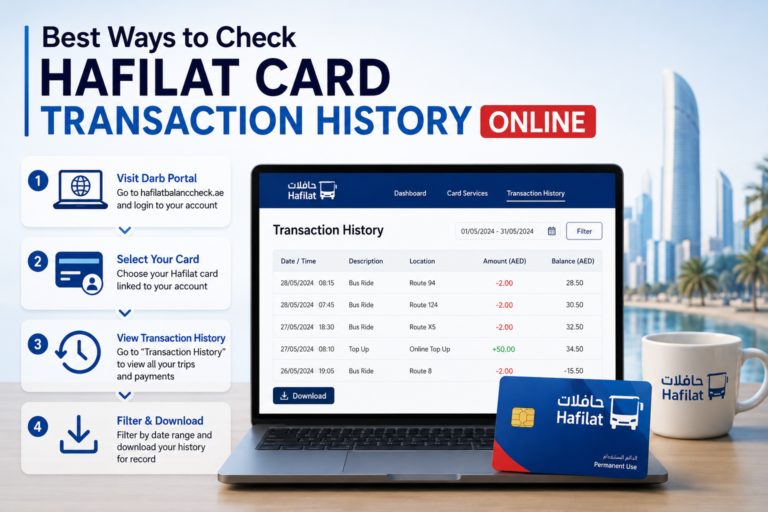
After completing your Hafilat recharge, it’s always smart to confirm that the balance has updated correctly. You can check Hafilat Card balance through the following:
- The TAMM portal or app, using your card serial number
- The DARBI app, after linking your card to your account
- Any TVM, by inserting or tapping your card on the reader
- The card reader on the bus, which briefly shows your balance when you tap to board or exit
Checking your balance regularly helps you avoid being caught off guard with insufficient funds when you’re about to travel.
Tips for a Smooth Hafilat Recharge Experience
Here are a few simple habits that can make managing your Hafilat card much easier:
- Set a minimum balance rule. Recharge whenever your balance drops below AED 15 to 20, so you’re never caught short before boarding.
- Recharge before you travel, not during. Online recharges can take up to two hours to reflect, so plan ahead if you’re depending on a digital top-up.
- Use offline methods for emergencies. If you need to travel immediately and your balance is low, head to the nearest TVM or customer happiness center for an instant top-up.
- Keep your card serial number handy. Save a photo of the back of your card on your phone so you always have your serial number ready when recharging online.
- Estimate your weekly travel cost. If you know roughly how much you spend on fares each week, you can recharge in bulk and avoid frequent small top-ups.
Frequently Asked Questions About Hafilat Recharge
Can I recharge someone else’s Hafilat card? Yes. Hafilat recharge is linked to the card serial number, not a specific person, so you can top up any Hafilat card online or at a machine as long as you have the correct card number.
How long does a Hafilat recharge take to show up? Offline methods like TVMs, retail outlets, and customer happiness centers are usually instant. Online methods through TAMM, DARBI, or the website can take up to two hours to reflect on your card.
What is the minimum top-up amount for Hafilat recharge? Most platforms offer predefined amounts starting from around AED 10, with common options including AED 10, 15, 20, 25, 30, 50, and 100.
Is DARB the same as DARBI for Hafilat recharge? No. DARBI is for Abu Dhabi public transport, including Hafilat card recharge and bus information. DARB is mainly used for toll gate payments for private vehicles and is not the place to recharge your Hafilat card.
Final Thoughts
Hafilat recharge doesn’t have to be complicated. Whether you prefer the convenience of the TAMM portal, the mobility of the DARBI app, or the simplicity of a ticket vending machine at your local bus station, Abu Dhabi offers a recharge method for every type of traveler. The key is to recharge regularly, keep an eye on your balance, and choose the method that fits your lifestyle so you’re always ready for your next bus ride.