Nol Card Balance Check With Number Online UAE
If you travel using Dubai’s public transport, keeping an eye on your Nol card balance should be part of your daily routine. A quick Nol card balance check can save you from awkward moments at the metro gate, missed buses, and even the AED 200 fine for traveling with insufficient funds. In this guide, we’ll cover every method available in 2026 to check your Nol card balance, explained in simple, easy-to-follow steps.
Whether you’re a Dubai resident, a daily commuter, or a visitor exploring the city, this article will help you find the balance check method that suits you best.
What Is a Nol Card and Why Should You Check Its Balance?
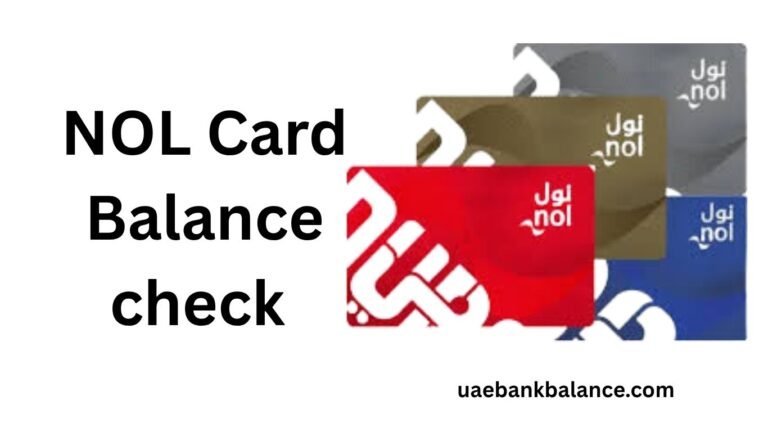
The Nol card is a prepaid smart travel card issued by Dubai’s Roads and Transport Authority (RTA). The word “Nol” comes from the Arabic word “نول,” which means “fare.” This card lets you pay for the Dubai Metro, public buses, the Dubai Tram, water buses, and even some retail outlets, all without using cash.
Each Nol card carries two important pieces of information:
- Current balance – the spendable credit available right now for your journey
- Pending credit – any recent top-up that hasn’t yet loaded onto the card’s chip
To start a journey on the Dubai Metro or RTA buses, your card needs a minimum balance of AED 7.50. If your balance is lower than this, the gate simply won’t open, and you’ll need to top up before you can travel. This is exactly why a quick Nol card balance check before heading out can save you time, stress, and money.
How to Check Nol Card Balance Online
Online methods are the quickest way to check Nol card balance, especially if you’re at home or don’t want to wait in line. Here are the main online options.
1. Nol Card Balance Check via the RTA Website
The official RTA website offers a simple Nol card balance check tool that doesn’t require any login. All you need is your card’s Tag ID.
Follow these steps:
| Step | Action |
| 1 | Visit the official RTA website |
| 2 | Go to “Public Transport” and select “Check Nol Balance“ |
| 3 | Enter your 10-digit Nol Tag ID, found on the back of your card |
| 4 | Click the “Search” or “Check My Balance” button |
| 5 | View your current balance, pending credit, and card expiry date |
This is the most common method because it works for Silver, Gold, and Blue Nol cards alike, and it shows your results instantly without any registration.
2. Nol Card Balance Check via the Nol Pay App
For a more detailed view, including your full transaction history, the Nol Pay app is the better choice. It’s available for iOS, Android, and Huawei devices, and it uses NFC (Near Field Communication) for quick checks.
Steps to check your balance using the app:
- Download the Nol Pay app from your device’s app store
- Open the app and select “Check Card Info” for a quick check without logging in, or log in with your Nol user ID for full account access
- Place your Nol card against the back of your phone and hold it steady for about 3 seconds
- Your balance, pending credit, and recent transactions will appear on screen
The Nol Pay app also lets you recharge Nol card, transfer balance, and view your complete transaction history, making it a useful all-in-one tool for regular commuters.
3. Nol Card Balance Check via SMS (511)
If you don’t have internet access, the SMS method works perfectly and is completely free of data charges.
Here’s how it works:
- Open your phone’s messaging app
- Type your 10-digit Nol Tag ID in the message body
- Send it to 511 to register your mobile number with RTA
- Once registered, send the word “BAL” or “Balance” to 511 at any time
- You’ll receive an SMS reply showing your current balance and your ten most recent transactions
This method is especially useful for travelers without a stable internet connection or those who prefer not to use apps.
How to Check Nol Card Balance Offline
If you’re already at a metro station or bus stop, there’s no need to pull out your phone. Dubai’s transport network has built-in offline methods for a fast Nol card balance check.
4. Check Balance at Metro Gates
This is the easiest and fastest method for daily commuters. Every time you tap your Nol card at a Dubai Metro gate, bus reader, or tram entrance, the screen briefly displays your remaining balance after the fare has been deducted. It takes no extra steps, just your regular tap to enter or exit.
5. Check Balance Using Ticket Vending Machines (TVMs)
Ticket vending machines and dedicated balance-checking devices are available at every Dubai Metro and bus station. To use one:
- Locate a TVM or balance inquiry device at the station
- Place your Nol card on the card reader
- The screen will instantly display your current balance, pending credit, and other card details
This method is ideal if you want a clear view of your balance before deciding how much to top up.
6. Check Balance at RTA Customer Service Centers
If you’d rather speak to someone directly, RTA customer service centers across Dubai can help with balance checks, as well as any issues with your card, such as replacements or disputes. This option is best if you’re dealing with a problem beyond a simple balance check, such as a pending top-up that hasn’t activated.
Comparing All Nol Card Balance Check Methods at a Glance
Here’s a quick comparison table to help you choose the right method for your situation:
| Method | Type | Internet Needed | Best For |
| RTA Website | Online | Yes | Quick check from home, no login required |
| Nol Pay App | Online | Yes (NFC also needed) | Detailed history, recharge, and transfers |
| SMS to 511 | Offline-friendly | No | Travelers without internet access |
| Metro/Bus Gate Tap | Offline | No | Daily commuters, on-the-go checks |
| Ticket Vending Machines (TVM) | Offline | No | Checking before deciding top-up amount |
| RTA Customer Service Centers | Offline | No | Resolving issues with pending credit or card faults |
Understanding Pending Credit on Your Nol Card
One thing that confuses many users is the difference between “current balance” and “pending credit.” Your current balance is the amount you can spend right now. Pending credit is a recent top-up that has been paid for but hasn’t yet been loaded onto the physical chip of your card.
To activate pending credit, simply tap your Nol card at any Dubai Metro gate, bus stop top-up machine, or RTA parking meter. This sync usually takes just one tap and happens instantly. If your balance check shows a pending amount that hasn’t moved into your spendable balance, this is the simple fix.
Tips for Managing Your Nol Card Balance
A few small habits can make a big difference in how smoothly your Dubai commute runs:
- Check your balance before leaving home. A quick SMS or app check takes seconds and can prevent gate rejections.
- Keep your balance above AED 7.50 at all times. This is the minimum needed to start a journey on the metro or bus.
- Register your number with 511 early. Once registered, checking your balance by SMS becomes instant for future use.
- Activate pending credit immediately after recharging. Tap your card at a gate or vending machine right after a top-up to avoid confusion about your real balance.
- Use the Nol Pay app if you recharge often. It combines balance checking, recharging, and transaction history in one place.
Frequently Asked Questions About Nol Card Balance Check
Do I need to log in to check my Nol card balance? No. Most methods, including the RTA website, SMS to 511, and the quick check feature on the Nol Pay app, only require your 10-digit Nol Tag ID and don’t need a login.
What happens if my Nol card balance is too low? If your balance falls below AED 7.50, the metro or bus gate will not open, and you’ll need to top up before continuing your journey. Traveling with insufficient balance can also result in a fine of AED 200.
Can I check my Nol card balance without an internet connection? Yes. You can send your Tag ID and the word “BAL” to 511 via SMS, or simply tap your card at a metro gate, bus reader, or ticket vending machine to view your balance instantly.
Why does my Nol card show a pending credit instead of my full balance? A pending credit means your recent top-up has been processed but not yet loaded onto your card’s chip. Tap your card at any metro gate or vending machine to activate it instantly.
Which Nol card types support balance checking through these methods? All Nol card types, including Silver, Gold, and Blue Personal Cards, support balance checks through the RTA website, Nol Pay app, SMS, and station-based methods.
Final Thoughts
A Nol card balance check is one of the simplest habits you can build into your daily routine, and Dubai’s RTA has made sure there’s a method for everyone. Whether you check online through the RTA website or Nol Pay app, by SMS when you’re offline, or with a simple tap at the metro gate, staying on top of your balance means smoother travel and fewer surprises. Pick the method that fits your lifestyle, make it a habit, and enjoy hassle-free commuting across Dubai’s metro, bus, and tram network.