ILOE Quick Pay Fine Check: How to Check and Pay Your Fine Online in UAE
You usually don’t search for “ILOE Quick Pay fine check” because you are curious about unemployment insurance. You search it because something has probably gone wrong — you missed an ILOE payment, forgot to renew your subscription, or suddenly discovered that a fine is showing against your UAE employment record. And when that happens, the last thing you want is to click through ten different websites trying to figure out where the actual fine check is.
The good news is that checking an ILOE fine is not as complicated as it first appears. You can use the ILOE Quick Pay service associated with MoHRE to check whether a fine is recorded and, where available, proceed with payment. You can also use the official ILOE portal or app to check your policy and payment information. The important part is using the correct official channel, because plenty of third-party pages use phrases such as “ILOE Quick Pay” in their titles.
Safety note: Do not enter your Emirates ID, card details, OTP, PIN or online-banking information into a website simply because it appears in a search for “ILOE Quick Pay.” Start from the official ILOE website or the MoHRE official website and use the relevant service from there. The official ILOE contact number is 600 599 555.
ILOE Quick Pay Fine Check Online: What Are You Actually Checking?
Let’s clear up one thing first.
When people search for ILOE Quick Pay fine check, they are usually looking for a way to find out whether a penalty has been recorded against them because they did not subscribe to ILOE on time or failed to keep their insurance payments up to date.
ILOE stands for Involuntary Loss of Employment Insurance.
The scheme provides financial protection to eligible workers who lose their jobs involuntarily. According to the official ILOE website, eligible workers can receive compensation of up to 60% of their average basic salary for the six months before losing employment, subject to the policy conditions. Compensation can be paid for a maximum of three consecutive months for an eligible claim.
So the fine is not the insurance itself.
It is a penalty connected with failing to comply with the ILOE requirements.
Read Also: Etisalat Quick Pay
How to Check Your ILOE Fine Online
If you simply want to know:
“Do I have an ILOE fine?”
the quickest approach is to use the official ILOE Quick Pay service available through MoHRE channels.
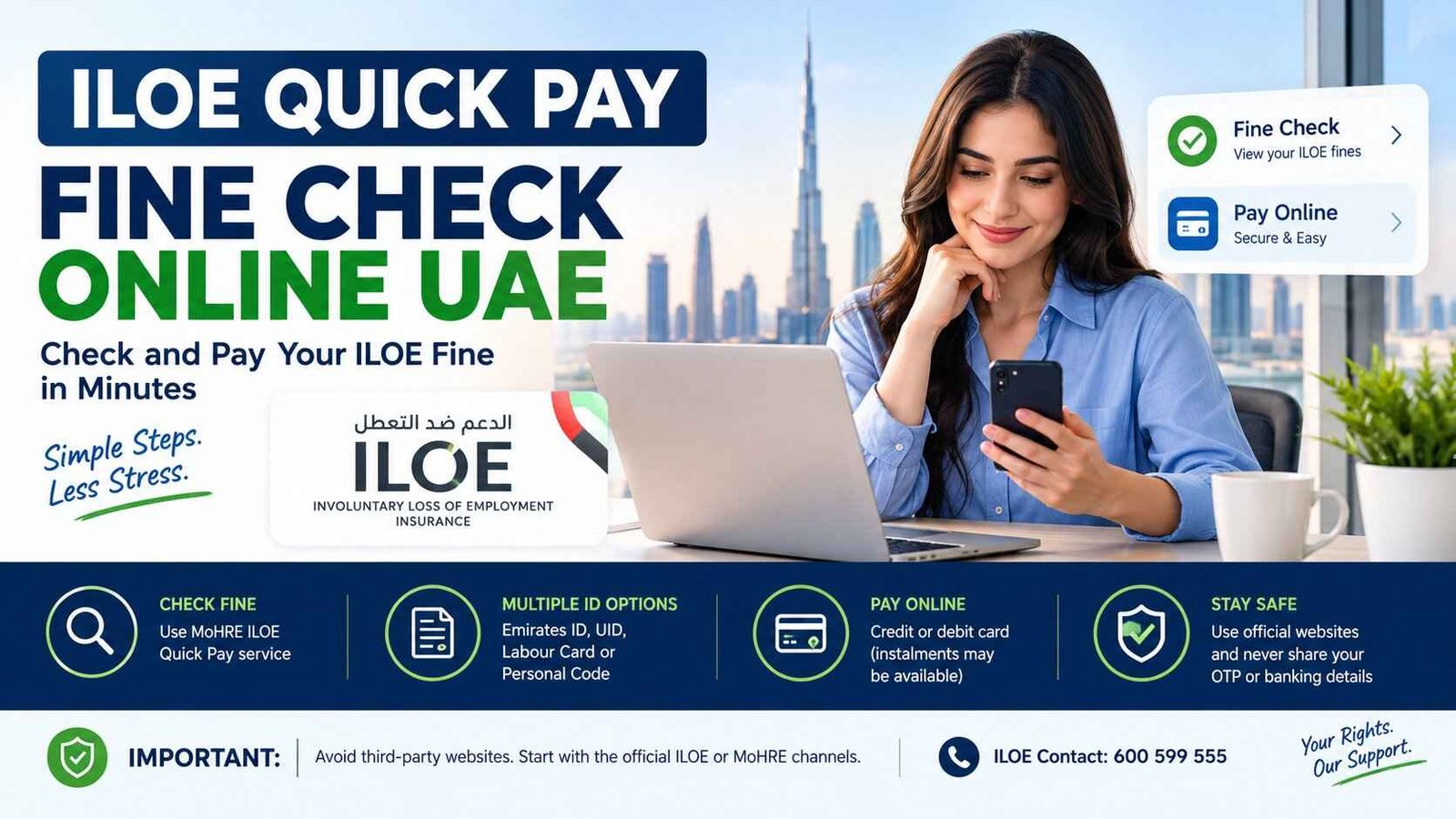
The service has been described by MoHRE-related guidance as allowing workers to search using identification details such as:
- Emirates ID number
- Unified Number (UID)
- Labour card number
- Personal code number
After entering the relevant information and selecting Search, the system can show whether a fine is recorded against the worker.
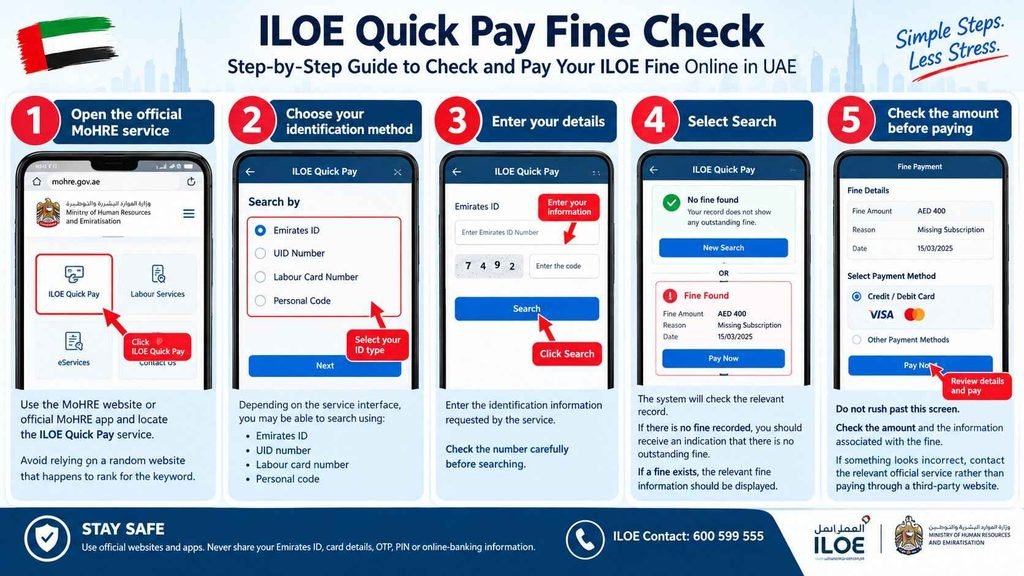
Step-by-step ILOE Quick Pay fine check
Step 1: Open the official MoHRE service
Use the MoHRE website or official MoHRE app and locate the ILOE Quick Pay service.
Avoid relying on a random website that happens to rank for the keyword.
Step 2: Choose your identification method
Depending on the service interface, you may be able to search using:
- Emirates ID
- UID number
- Labour card number
- Personal code
Step 3: Enter your details
Enter the identification information requested by the service.
Check the number carefully before searching.
Step 4: Select Search
The system will check the relevant record.
If there is no fine recorded, you should receive an indication that there is no outstanding fine.
If a fine exists, the relevant fine information should be displayed.
Step 5: Check the amount before paying
Do not rush past this screen.
Check the amount and the information associated with the fine.
If something looks incorrect, contact the relevant official service rather than paying through a third-party website.
What If ILOE Quick Pay Shows No Fine?
That’s good news, but don’t automatically assume everything about your ILOE policy is perfect.
A fine check and a policy-status check are not exactly the same thing.
The official ILOE FAQ explains that policyholders can log in to the ILOE portal or app, select their sector, enter their Emirates ID and mobile number, request an OTP and then use View Statement to check payment information.
So if your main concern is:
“Did I pay my ILOE premium?”
rather than:
“Do I have a fine?”
checking your ILOE statement may be the more useful step.
How to Check Your ILOE Payment Status
If you already subscribed to ILOE and simply want to see what you have paid, use the official ILOE portal or app.
According to the official FAQ:
- Open the ILOE website or mobile app.
- Select your employment sector.
- Enter your Emirates ID.
- Enter your mobile number.
- Request the OTP.
- Sign in.
- Select View Statement.
This allows you to see your payment information.
This is particularly useful if you are confused because you remember paying ILOE but a fine still appears somewhere.
Why Do I Have an ILOE Fine?
There are a few situations that can lead to an ILOE penalty.
One common situation is failing to subscribe within the required period.
Another is allowing your insurance premium payments to remain unpaid.
The official ILOE FAQ states that if the insured person fails to pay premiums according to the selected payment schedule for more than three months from the premium due date, the insurance policy can be cancelled and a fine imposed according to the applicable law.
This is why a person can be surprised by a fine even though they previously subscribed.
They may have subscribed once but later stopped making the required payments.
What Is the ILOE Fine Amount?
The fine depends on the reason for the penalty.
A commonly referenced ILOE penalty is:
| Situation | Fine |
|---|---|
| Failure to subscribe to the ILOE scheme within the required period | AED 400 |
| Failure to pay premiums for more than the applicable three-month period | AED 200 |
MoHRE guidance and UAE reporting have described these penalties as AED 400 for failing to subscribe and AED 200 for certain unpaid-premium cases.
However, if you are checking your own record, do not rely only on a table on a website.
The amount displayed against your official record is what matters.
ILOE Quick Pay Fine Check Using Emirates ID
For most people, the Emirates ID route is the easiest option if it is available in the Quick Pay service.
You don’t need to remember every detail about your old employment record just to start the check.
The process generally involves selecting Emirates ID (EIDA) as the identification type, entering your number and selecting Search.
If the record is found, you can see whether a fine has been registered.
If you get an error, don’t immediately conclude that you have no fine.
There may be an issue with the information you entered or the record itself.
Can I Check an ILOE Fine With UID Number?
Yes, the Quick Pay service has also been reported as supporting the Unified Number (UID) as an identification option.
This can be useful if you are having difficulty using another identification method.
The important thing is to select the correct identification type before entering the number.
Can I Check an ILOE Fine With Labour Card Number?
Yes, the ILOE Quick Pay service can also use the labour card number as an identification option.
This can be especially useful for workers who still have their labour-card information available but are unsure about another identifier.
What Is the Personal Code for ILOE Quick Pay?
Another identification option that may appear is the personal code number.
According to guidance on the Quick Pay process, this is a 14-digit number associated with the labour card.
If you don’t know your personal code, using another available identification method may be easier.
How to Pay an ILOE Fine Online
Finding the fine is only half the problem.
Most people searching this keyword actually want to know:
“Okay, I found the fine. How do I get rid of it?”
Where the Quick Pay service provides the payment option, you can proceed with the online payment using the available payment method.
Reported MoHRE guidance says the fine can be paid online by credit or debit card, and instalment payment may also be available.
Before paying, make sure you are still on the official government service.
After making the payment
Keep your payment confirmation.
A screenshot or electronic receipt is useful if you later need to prove that you paid.
Also remember that an online payment may not necessarily update every system immediately.
According to reported MoHRE guidance, payment processing can take one working day.
So don’t panic if you pay today and the status doesn’t change instantly.
I Paid My ILOE Fine but It Still Shows
This is one of those situations where people often think:
“I paid it, so why is it still there?”
Don’t immediately pay the same fine again.
First, allow the payment to be processed.
MoHRE-related guidance has stated that online fine payments can take one working day to process.
Keep your receipt and check the status again after processing.
If the fine continues to appear after the expected processing period, contact the official service rather than making another payment blindly.
What Happens If You Don’t Pay an ILOE Fine?
Ignoring an ILOE fine is not a good idea.
The consequences can go beyond simply having an unpaid amount sitting on your record.
MoHRE has previously warned that unpaid ILOE fines can result in administrative measures, including issues with new work permits and possible deduction from salary or end-of-service benefits.
There is another important issue.
If your ILOE insurance policy is cancelled because premiums remained unpaid for more than three months, you may need to subscribe again.
And that matters because eligibility for ILOE compensation requires a qualifying period of 12 consecutive months of subscription under the applicable conditions.
So ignoring a relatively small fine can potentially create a much bigger problem later.
Does Paying the Fine Automatically Give Me ILOE Coverage?
No.
This is an important distinction.
Paying a fine does not automatically mean you have completed a new qualifying insurance period.
If your previous insurance certificate was cancelled because of prolonged non-payment, the official ILOE FAQ says the employee must subscribe again through a new insurance policy.
If you are relying on ILOE as financial protection against involuntary job loss, check your actual policy status after resolving the fine.
What Happens If My ILOE Policy Was Cancelled?
If the policy was cancelled after premiums remained unpaid beyond the applicable period, you may need to take two separate steps:
First: settle the applicable fine.
Second: subscribe again to a new ILOE policy.
The official FAQ specifically confirms that a worker whose insurance certificate has been cancelled can re-subscribe through a new insurance policy.
This is one reason it is better not to leave an ILOE problem unresolved.
Can I Check My ILOE Fine Through the ILOE Website?
There is an important distinction here.
The official ILOE website provides access to the ILOE portal and explains how policyholders can view their policy and payment details.
The ILOE Quick Pay service is associated with the MoHRE route used for checking and paying ILOE fines.
So don’t get stuck thinking there must be one single page called “ILOE Fine Check” on iloe.ae.
There are different official channels serving different purposes.
ILOE Website vs ILOE Quick Pay
This simple comparison can save you a lot of confusion:
| What you want to do | Best place to start |
|---|---|
| Check ILOE policy information | Official ILOE portal/app |
| Check payment statement | ILOE portal/app |
| Check an ILOE fine | MoHRE ILOE Quick Pay |
| Pay an ILOE fine | Official Quick Pay/payment channel |
| Ask about your ILOE record | ILOE call centre |
| General ILOE information | ILOE official website |
The official ILOE website lists 600 599 555 as its contact number.
What If I Can’t Find the ILOE Quick Pay Service?
This is where you should stop searching random websites.
Instead, go directly to the official MoHRE website or use the official MoHRE mobile application.
The service interface can change, so an old article may show screenshots or menu names that no longer look exactly the same.
That’s normal.
The important thing is that you are accessing the service through the official government channel.
ILOE Quick Pay Not Working? Try This
If the service is not showing your information, check the basics first.
Check your identification number
A single wrong digit can produce a failed search.
Try another available identification method
If you have your UID or labour card number, you may be able to try that instead.
Check whether your mobile information is current
Some government services depend on information linked to your official records.
Don’t create another payment
If you already paid, first check your receipt and allow time for processing.
Contact ILOE support
The official ILOE contact number is:
600 599 555
Why You Should Be Careful With “ILOE Quick Pay” Search Results
This deserves special attention.
When you search Google for ILOE Quick Pay fine check, you may see websites that have copied the exact phrase into their page titles.
That doesn’t make them government websites.
Your Emirates ID is sensitive personal information.
You don’t need to give it to the first website that says it can “check your ILOE fine.”
Use the official ILOE and MoHRE channels.
The official ILOE website itself lists its portal, mobile app and other authorized payment channels.
ILOE Fine Check and Payment: The Simple Version
If you’re in a hurry, here’s the whole process without all the extra explanation:
Need to check a fine?
Go to the official MoHRE channel and open ILOE Quick Pay.
Have an Emirates ID?
Use the Emirates ID option where available.
Fine appears?
Review the amount and details.
Need to pay?
Use the payment option provided by the official service.
Already paid?
Keep the receipt and allow time for processing.
Policy cancelled?
Check the ILOE portal and re-subscribe if required.
Something still looks wrong?
Call 600 599 555.
That’s it.
You don’t need to visit five websites to work this out.
People Also Ask
How do I check my ILOE fine online?
Use the official MoHRE ILOE Quick Pay service and search using an available identification method such as Emirates ID, UID, labour card number or personal code.
What is the ILOE Quick Pay fine?
It is a service used to check and pay certain fines associated with the UAE’s mandatory ILOE unemployment-insurance requirements.
How much is the ILOE fine in UAE?
Commonly reported penalties include AED 400 for failure to subscribe and AED 200 for certain cases involving unpaid premiums for more than three months. Your official record should be used to confirm the amount applicable to you.
Can I pay my ILOE fine online?
Yes. Where the official Quick Pay service provides the payment option, the fine can be paid online using the available payment methods.
How long does an ILOE fine payment take to update?
Reported MoHRE guidance says online payments can take one working day to process. Keep your receipt while waiting for the status to update.
What happens if I don’t pay my ILOE fine?
Unpaid fines can lead to administrative consequences. If unpaid insurance premiums cause your policy to be cancelled, you may also need to subscribe again and restart the qualifying subscription period.
Can I check my ILOE payment history?
Yes. The official ILOE FAQ says you can log in to the ILOE portal or app, verify using your Emirates ID and mobile number, and select View Statement to see payment information.
What if I paid but my ILOE fine is still showing?
Don’t immediately pay again. Keep your payment receipt, allow the payment to process, and contact the official ILOE support channel if the record does not update.
Frequently Asked Questions
Is ILOE mandatory in the UAE?
The ILOE scheme is mandatory for eligible private-sector and federal-government employees, with specific categories exempted under the applicable rules.
How much does ILOE insurance cost?
The current official ILOE website lists Category A, for basic salaries of AED 16,000 or below, at AED 5 plus VAT per month, and Category B, for basic salaries above AED 16,000, at AED 10 plus VAT per month.
How long must I pay ILOE before I can claim compensation?
The official ILOE information states that eligible workers must have paid premiums for at least 12 consecutive months before qualifying for compensation, subject to the other policy conditions.
How much can I receive from ILOE?
Eligible workers can receive up to 60% of their average basic salary for the six months before unemployment, subject to the applicable category limits and other conditions. Category A has a maximum of AED 10,000 per month and Category B has a maximum of AED 20,000 per month, with compensation for a maximum of three consecutive months per claim.
What is the ILOE customer-care number?
The official ILOE website lists 600 599 555 as its contact number.
Final Takeaway
If you searched “ILOE Quick Pay fine check” because you’re worried about an unexpected fine, don’t overcomplicate it.
Start with the official MoHRE ILOE Quick Pay service to check whether a fine is recorded. You can use an available identification method such as your Emirates ID, UID, labour card number or personal code. If a fine appears, follow the official payment process and keep your receipt.
If what you really want to know is whether your ILOE insurance payments are up to date, use the official ILOE portal or app and check View Statement instead.
And don’t make the mistake of thinking that paying a fine automatically restores everything. If your insurance certificate has already been cancelled because of prolonged non-payment, the official ILOE FAQ says you need to subscribe again through a new policy.
Most importantly, don’t hand your Emirates ID or banking information to an unknown “Quick Pay” website just because it appears in Google. For something as important as your employment and insurance record, go straight to the official UAE channels.