How to Transfer Money From BOTIM to Bank Account in UAE – Step-by-Step Guide
You have money sitting in your BOTIM Wallet, and now you want it in your normal UAE bank account. Sounds simple, right?
But when you open the BOTIM app, there are several money-related options, and it is easy to wonder which one you actually need. Are you supposed to send the money? Transfer it? Withdraw it? And will the money reach your bank immediately?
If that is exactly where you are stuck, you are not alone. The good news is that BOTIM does provide a withdrawal option for moving your BOTIM Pay balance to a UAE bank account. The process is done directly from the Wallet section, and BOTIM says you need to enter your bank account’s IBAN and related information.
Safety note: Only use the official BOTIM app and official BOTIM website when dealing with your wallet or bank details. Never give your OTP, payment password, Emirates ID information, card details or banking credentials to someone claiming they can “release” or “activate” your BOTIM withdrawal.
Can You Transfer Money From BOTIM to a UAE Bank Account?
Yes. If you have an available balance in your BOTIM Pay account, BOTIM’s official instructions provide a Withdraw option for transferring that balance to your UAE bank account.
The route is:
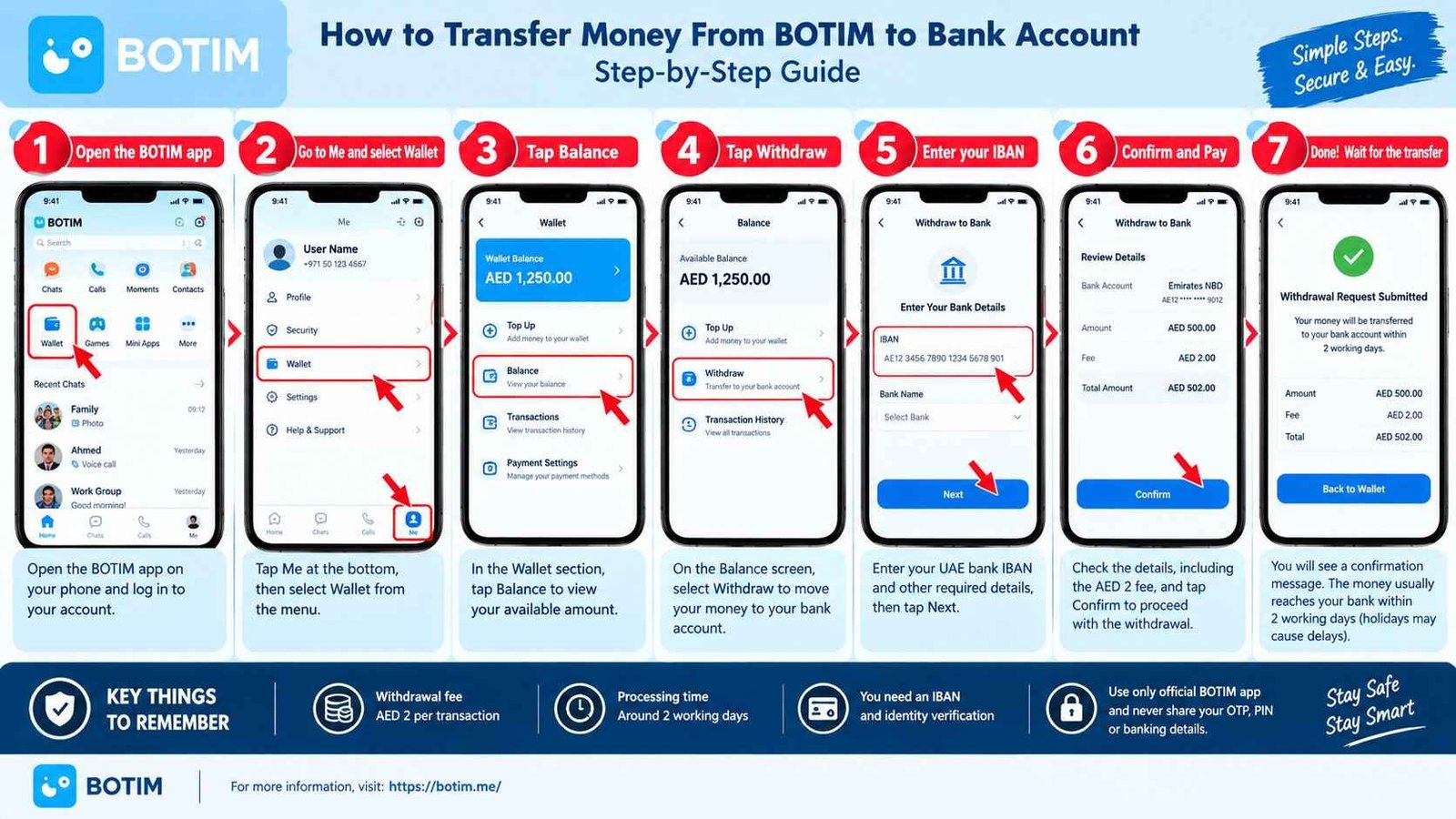
Me → Wallet → Balance → Withdraw
You then enter your IBAN and the required related information and complete the withdrawal process.
This is different from sending money to another BOTIM user.
It is also different from an international money transfer.
If your goal is simply:
BOTIM Wallet → Your UAE bank account
then the Withdraw option is the one you are looking for.
Read More: Botim Money Transfer Issues
How to Transfer Money From BOTIM to Bank Account
Here is the process in simple terms.
Step 1: Open the BOTIM app
Start by opening the BOTIM app on your phone and logging in to the account that contains your wallet balance.
If you have not completed your BOTIM payment account setup, you may need to complete identity verification first. BOTIM says its payment-account setup includes agreeing to the terms, creating a six-digit payment password and completing identity verification using your Emirates ID and facial recognition.
Make sure you are using the latest version of the app if you cannot find the Wallet options.
Step 2: Go to “Me”
After opening BOTIM, tap Me.
This takes you to your account and personal settings.
From there, look for Wallet.
Step 3: Open Wallet
Tap Wallet to access your BOTIM payment balance and related money services.
You should be able to see your available balance and the wallet options available to your account.
This is the point where many users go looking for a normal “bank transfer” button.
Instead, if you are trying to move your own BOTIM balance into your UAE bank account, look for Balance and then Withdraw.
Step 4: Select Balance
Tap Balance.
You are now dealing with the actual money available in your BOTIM Wallet rather than the general payment or transfer features.
If your available balance is different from what you expected, check your recent transaction history before starting the withdrawal.
Step 5: Tap “Withdraw”
This is the important step.
Select Withdraw.
BOTIM’s official FAQ specifically directs users who want to withdraw their BOTIM Pay balance to a UAE bank account to use:
Me → Wallet → Balance → Withdraw.
You do not need to search the internet for a separate “BOTIM bank withdrawal website.”
If the option is available in your account, start the process inside the official BOTIM app.
Step 6: Enter your UAE bank IBAN
BOTIM asks you to enter your IBAN number and related bank information for the withdrawal.
This is where you should slow down for a moment.
An IBAN is a long number, so one wrong digit can create problems.
Before submitting:
- Check the IBAN carefully.
- Make sure it belongs to the intended UAE bank account.
- Check any other bank information requested by the app.
- Do not copy banking details from an unknown message or website.
- Review the withdrawal amount before confirming.
If BOTIM displays the bank-account information before confirmation, use that screen as your final check.
How Much Does BOTIM Charge for Bank Withdrawal?
BOTIM’s current official FAQ states that a AED 2.00 fee is charged per withdrawal transaction when withdrawing funds to a UAE bank account.
So, if you withdraw AED 500, you should not assume that the full AED 500 will reach your bank account without a fee.
The published BOTIM withdrawal fee is:
| Withdrawal service | Current published fee |
|---|---|
| BOTIM balance withdrawal to UAE bank account | AED 2 per transaction |
Fees can change, so it is sensible to check the amount shown inside the app before confirming the transaction.
How Long Does BOTIM Bank Withdrawal Take?
This is another point where expectations matter.
BOTIM says withdrawals to a UAE bank account will generally arrive in about 2 working days. It also warns that public holidays can cause additional delays.
So do not automatically assume that a withdrawal made today must appear in your bank account immediately.
A simple example:
If you make a withdrawal on a normal working day, it may arrive within the stated processing period. But weekends and public holidays can affect when the bank actually receives or posts the money.
If the money has not arrived after the expected period, check the transaction record first rather than submitting the withdrawal repeatedly.
What If You Cannot See the Withdraw Option?
This is one of the most useful troubleshooting points.
If you open:
Me → Wallet → Balance
but cannot find the withdrawal option, do not immediately assume that your money is gone.
First check whether your payment account is fully set up and verified.
BOTIM says users can complete their profile through:
Me → Wallet → Settings → Complete Your Profile
and that identity verification may increase transaction limits when users have limit-related problems.
You should also make sure you are using the latest BOTIM app version.
If the problem continues, use BOTIM’s official customer-support route rather than paying someone online to “fix” the withdrawal.
What If BOTIM Says the Withdrawal Was Successful but the Money Has Not Arrived?
This is probably the most worrying situation.
You see the withdrawal in BOTIM, but your bank account does not show the money.
First, don’t panic and don’t immediately make another withdrawal.
Check these things:
Check the withdrawal record
Open your BOTIM transaction history and confirm:
- The withdrawal amount
- The date
- The transaction status
- The bank details used
- Any available transaction reference
Then check your bank account again after allowing the normal processing period.
BOTIM says withdrawals generally arrive in about two working days, with possible delays around public holidays.
Check your bank account directly
Do not rely only on a notification.
Open your bank’s official mobile app or internet banking and check the actual account balance and recent transactions.
Contact BOTIM if the money still has not arrived
BOTIM specifically says that if you do not receive funds in your bank account after a withdrawal, you can contact its customer service and provide the registered mobile number and a screenshot of the transfer record.
Do not send your banking password, OTP or card PIN to customer support or anyone else.
BOTIM Wallet Transfer vs Bank Withdrawal: What Is the Difference?
This is where many searches become confusing.
BOTIM supports several different ways of moving money.
| What you want to do | What you generally need |
|---|---|
| Move your BOTIM balance to your UAE bank account | Use Withdraw |
| Send money to another BOTIM Wallet user | Use the relevant wallet transfer feature |
| Send money internationally | Use BOTIM’s International Transfer service |
| Add money to your BOTIM Wallet | Use an available wallet funding method |
BOTIM’s platform terms state that its Wallet services can be used for domestic and international transfers, while value can also be added or removed through supported methods including bank transfers to or from a nominated bank account.
So if you are simply trying to get your own wallet balance back into your UAE bank account, don’t accidentally start an international remittance.
Can I Transfer BOTIM Money to Someone Else’s Bank Account?
Be careful with this question because there are two different situations.
If you want to withdraw your own BOTIM Wallet balance, BOTIM’s FAQ describes the process for withdrawing to your UAE bank account using your IBAN.
That is not the same as sending money to another person’s bank account.
If you want to send money to another person, especially internationally, use the appropriate transfer service in BOTIM and check the beneficiary details, destination, fees and delivery method before confirming.
BOTIM’s international transfer service currently supports transfers from the UAE to supported destinations, with options that can include bank account delivery, cash pickup or digital-wallet delivery depending on the destination.
Is BOTIM Bank Withdrawal Free?
No.
BOTIM currently states that withdrawing funds from your BOTIM Pay balance to a UAE bank account costs AED 2 per transaction.
This is important because someone may see a low or zero-fee statement for another BOTIM service and assume that bank withdrawal is also free.
Different wallet services can have different fees.
Always check the withdrawal screen before you confirm.
Why Is My BOTIM Withdrawal Pending?
A pending withdrawal does not automatically mean that your money has disappeared.
Possible reasons include normal processing time, bank processing, weekends or public holidays.
BOTIM says bank withdrawals generally arrive in around two working days and notes that public holidays can cause delays.
If the expected processing period has passed, check your transaction record and contact BOTIM support if necessary.
Do not repeatedly submit the same withdrawal simply because you cannot see the money immediately.
What If I Entered the Wrong IBAN?
This is a situation where you should act carefully.
If you realize that you entered incorrect bank information, check the status of the transaction immediately and contact BOTIM through its official support channels if the transaction has already been submitted.
Do not wait several days hoping that the problem will automatically fix itself.
Also, never give your banking login details or OTP to someone who claims they can manually correct the transfer.
Is BOTIM Safe for Bank Transfers?
BOTIM states that its Wallet services are provided through Botim Money, and its current platform terms say Botim Money is regulated by the UAE Central Bank to provide stored-value facilities and certain payment services. The terms also state that wallet funds are held in a dedicated account with a UAE Central Bank-licensed bank, subject to the applicable regulatory arrangements.
That does not mean users should ignore basic security.
The safest approach is simple:
Use the official BOTIM app, verify the bank details yourself, and never share your OTP or payment password.
BOTIM also warns in its refund-policy information about losses caused by phishing websites and users disclosing bank-card or account information to third parties.
Quick Checklist Before You Withdraw BOTIM Money
Before tapping the final confirmation button, check these five things:
- Your BOTIM Wallet has enough available balance.
- Your UAE bank IBAN is correct.
- The withdrawal amount is correct.
- You understand the AED 2 withdrawal fee.
- You are using the official BOTIM app rather than a third-party website.
That five-second check can save you a lot of unnecessary trouble.
What Should You Do If BOTIM Money Does Not Reach Your Bank?
If your withdrawal has already been processed but the money has not appeared in your bank account:
First: Check the BOTIM transaction record.
Second: Check your UAE bank account directly.
Third: Allow for BOTIM’s stated processing period of around two working days and possible public-holiday delays.
Fourth: If the money is still missing, contact BOTIM customer service and provide the registered mobile number and transfer-record screenshot as BOTIM recommends for withdrawal issues.
Don’t send your OTP, card PIN or online-banking password to anyone.
Frequently Asked Questions
How do I transfer money from BOTIM to my bank account?
Open BOTIM and go to Me → Wallet → Balance → Withdraw. Enter your UAE bank IBAN and the other information requested by the app, then confirm the withdrawal.
How much does BOTIM charge to withdraw money to a bank account?
BOTIM’s official FAQ currently states a AED 2 fee per withdrawal transaction to a UAE bank account.
How long does BOTIM take to transfer money to a bank account?
BOTIM says withdrawals will generally arrive in about two working days, although public holidays may cause delays.
Do I need an IBAN to withdraw BOTIM money?
Yes. BOTIM’s official withdrawal instructions tell users to enter their IBAN and related information when withdrawing their BOTIM Pay balance to a UAE bank account.
Why can’t I withdraw my BOTIM balance?
Check that your payment account is properly set up and verified, your profile is complete, and you are using the latest version of the app. BOTIM also provides account-verification steps for users experiencing withdrawal or transaction-limit problems.
Can I transfer BOTIM money internationally?
Yes. BOTIM offers an International Transfer service to supported destinations. The available delivery method, fees, exchange rate and limits depend on the destination and transfer method and are shown in the app before completing the transfer.
What should I do if my BOTIM withdrawal has not arrived?
Check the withdrawal transaction and your bank account first. If the funds still have not arrived after the expected processing period, BOTIM says you can contact customer service with your registered mobile number and a screenshot of the transfer record.
Final Takeaway
If you already have money in your BOTIM Wallet and simply want to move it into your UAE bank account, you don’t need to overcomplicate it.
Go to:
Me → Wallet → Balance → Withdraw
Enter your IBAN, check the amount and fee, and confirm the transaction.
BOTIM currently states that the bank withdrawal fee is AED 2 per transaction and that the money generally reaches the UAE bank account in around two working days, although holidays can cause delays.
The important part is not rushing through the process. Check the IBAN carefully, use the official app, keep your transaction record, and never give your OTP or banking credentials to somebody promising to speed up your withdrawal.