How to Use ADCB TouchPoints in UAE (2026): Complete Redemption Guide
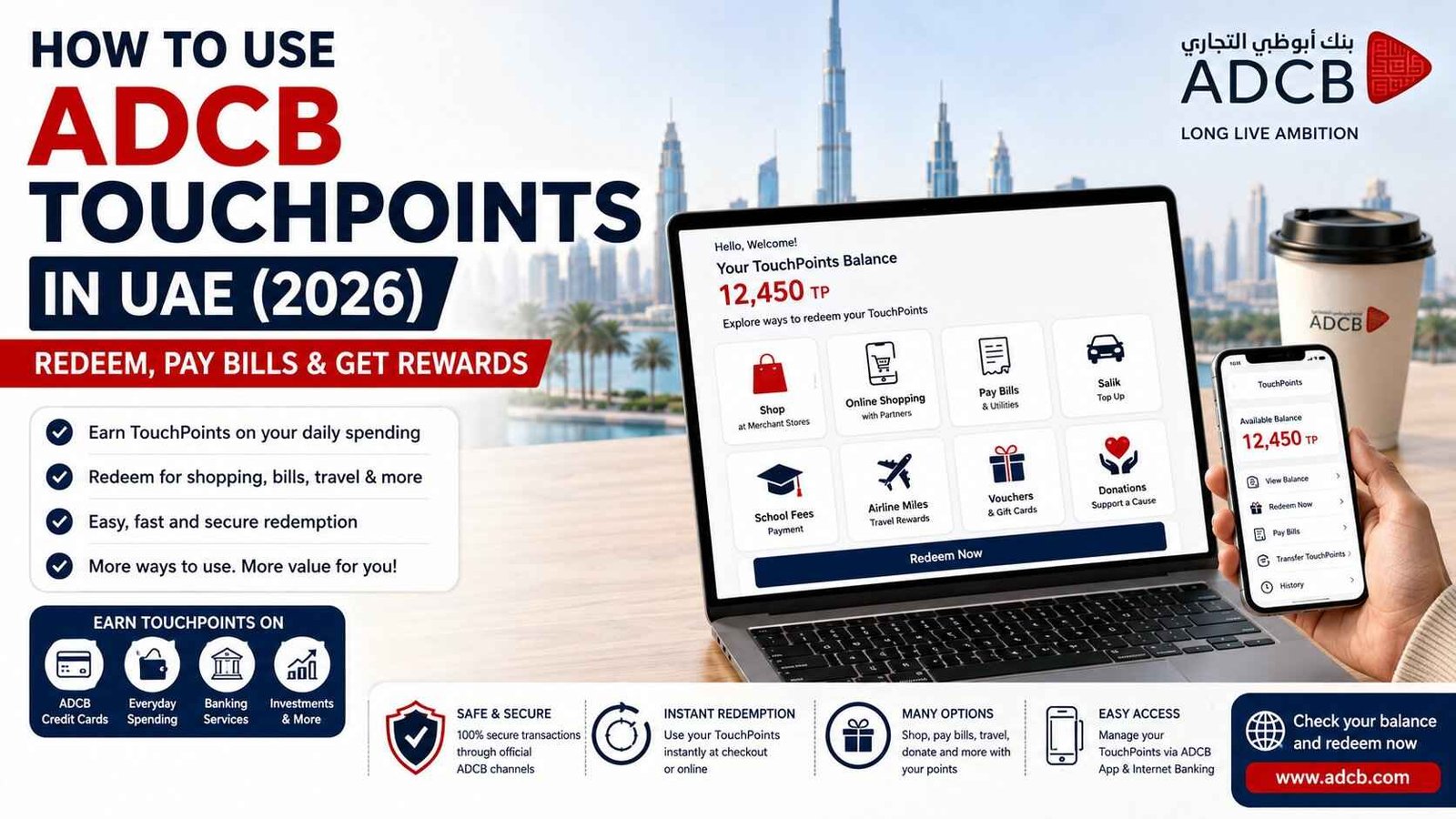
If you have been earning ADCB TouchPoints through your credit card, banking services, or other eligible ADCB products, you may eventually ask an important question: how to use ADCB TouchPoints?
Many customers collect points for months without redeeming them because they are unsure where to use them. Fortunately, ADCB TouchPoints can be used in several ways, depending on the redemption option available to your account. You may be able to use your points for shopping, eligible online purchases, bill payments, travel-related rewards, donations, school fees, vouchers, and more.
The best way to use your TouchPoints depends on what you need at the time. For example, if you want to reduce the cost of an eligible purchase, you may prefer instant redemption. If you need to pay an eligible utility bill, you may use TouchPoints through ADCB’s digital banking channels. Some customers may also prefer to convert eligible points into airline miles or use other available rewards.
Official ADCB TouchPoints Information: Always check the latest redemption options, eligible partners, and current terms directly through ADCB TouchPoints official page or ADCB’s official digital banking services, as available partners and redemption conditions can change.
What Are ADCB TouchPoints?
ADCB TouchPoints is the bank’s rewards programme that allows eligible customers to earn points through qualifying ADCB products, services, card spending, and other eligible banking activities.
Depending on your eligible relationship with ADCB, you may earn TouchPoints through activities such as using an eligible ADCB credit card, using qualifying banking products, investing, using finance solutions, and selected electronic banking activities. The exact number of points earned depends on the specific ADCB product and its applicable terms.
The points you earn are added to your TouchPoints balance and can later be redeemed through available ADCB channels and eligible partners.
One important thing to understand is that the value of your TouchPoints can depend on how you redeem them. Different redemption categories may require different numbers of points for the same AED value. Therefore, it is a good idea to check the available redemption option before using a large number of points.
How to Check Your ADCB TouchPoints Balance
Before redeeming your points, first check how many TouchPoints are available in your account.
You can check your balance through the ADCB Mobile Banking App.
Step 1: Open the ADCB Mobile Banking App
Open the official ADCB Mobile Banking App on your mobile phone and sign in securely.
Step 2: Go to the Main Dashboard
After logging in, you will see your main banking dashboard.
Step 3: Select TouchPoints
Look for the TouchPoints option from the main dashboard.
Step 4: Check Your Available Balance
Your available TouchPoints balance will be displayed. You can then review the redemption options available to you.
ADCB’s mobile banking information also lists options to view your TouchPoints balance, transfer TouchPoints to another eligible person, and redeem points for eligible bill payments through the app.
How to Use ADCB TouchPoints for Shopping at Merchant Stores
One of the easiest ways to use ADCB TouchPoints is through instant redemption at eligible merchant locations.
Step 1: Visit an Eligible Merchant
Choose a participating merchant that accepts ADCB TouchPoints.
Step 2: Select Your Items
Choose the products or services you want to purchase as you normally would.
Step 3: Ask to Pay Using TouchPoints
Before completing the payment, tell the staff that you want to use your ADCB TouchPoints.
Step 4: Present Your Eligible ADCB Card
Present your eligible ADCB credit or debit card as required for the redemption process.
Step 5: Complete the Transaction
The merchant processes the available TouchPoints redemption, subject to your balance and the applicable terms.
ADCB states that eligible customers can redeem TouchPoints instantly at selected merchant locations, and the available partner network may change over time. Always confirm that the specific merchant and redemption method are currently eligible before making your purchase.
How to Use ADCB TouchPoints Online
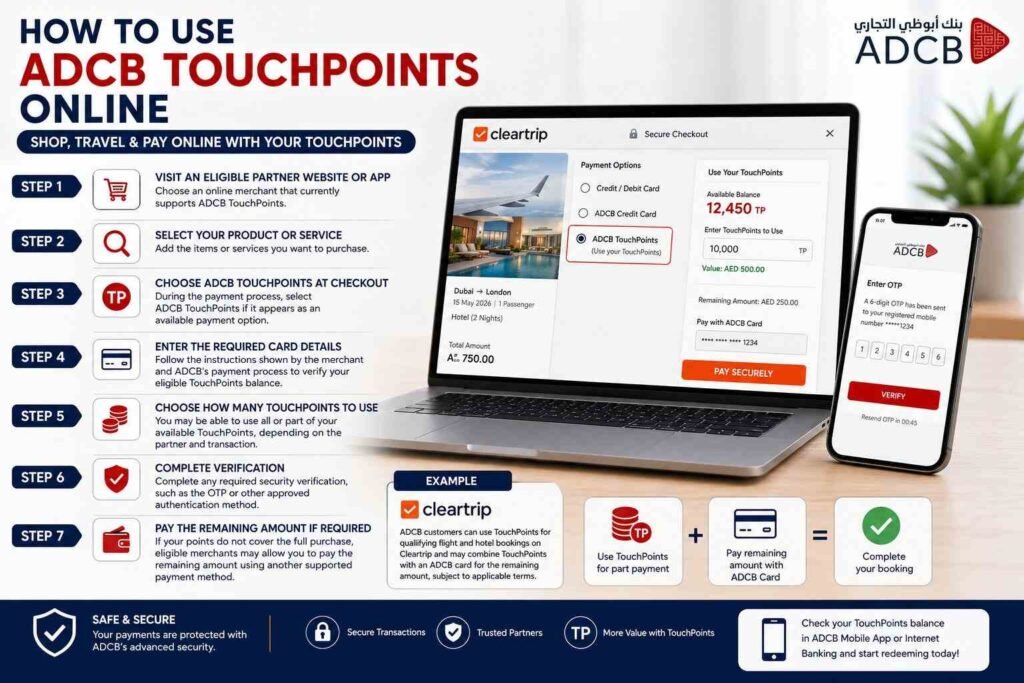
ADCB also offers eligible online redemption options through participating e-commerce partners.
The general process is simple.
Step 1: Visit an Eligible Partner Website or App
Choose an online merchant that currently supports ADCB TouchPoints as a payment or redemption option.
Step 2: Select Your Product or Service
Add the items or services you want to purchase.
Step 3: Choose ADCB TouchPoints at Checkout
During the payment process, select ADCB TouchPoints if it appears as an available payment option.
Step 4: Enter the Required Card Details
Follow the instructions shown by the merchant and ADCB’s payment process to verify your eligible TouchPoints balance.
Step 5: Choose How Many TouchPoints to Use
You may be able to use all or part of your available TouchPoints, depending on the partner and transaction.
Step 6: Complete Verification
Complete any required security verification, such as the OTP or other approved authentication method.
Step 7: Pay the Remaining Amount if Required
If your points do not cover the full purchase, eligible merchants may allow you to pay the remaining amount using another supported payment method.
For example, ADCB’s official information for Cleartrip states that eligible customers can use TouchPoints for qualifying flight and hotel bookings and may be able to combine TouchPoints with an ADCB card for the remaining amount, subject to the applicable terms.
How to Use ADCB TouchPoints Through the Mobile App
The ADCB Mobile Banking App provides another convenient way to manage and use your rewards.
After signing in:
- Select TouchPoints from the main dashboard.
- Choose the available redemption or management option.
- Review your available TouchPoints balance.
- Select the service or redemption category you want to use.
- Follow the on-screen instructions.
- Complete any required security verification.
Depending on the services currently available to your account, you may be able to use the app for activities such as checking your balance, redeeming points for eligible bill payments, and transferring TouchPoints.
How to Use ADCB TouchPoints for Bill Payments
If you have eligible bills to pay, TouchPoints may provide a useful redemption option.
ADCB lists bill payment redemption among its available TouchPoints options. Eligible customers can access TouchPoints through ADCB Personal Internet Banking or Mobile Banking, choose Redeem Now, select the preferred available redemption option, and follow the payment instructions.
Depending on the current services available, eligible redemption categories can include utility bill payments and other supported services. The exact list may change, so check the available options inside your official ADCB banking channel before proceeding.
Can You Use ADCB TouchPoints for Salik?
ADCB’s published redemption information includes Salik among certain bill-payment-related redemption categories. The number of TouchPoints required depends on the applicable redemption rate and ADCB’s current programme rules.
Because redemption rates and eligible categories can be updated, always check the current TouchPoints section in ADCB Personal Internet Banking or the ADCB Mobile Banking App before using your points for Salik.
Can You Use ADCB TouchPoints for School Fees?
Yes, ADCB lists school and college fee payments among its TouchPoints redemption options.
The availability of this service depends on the eligible payment option and current programme conditions. To use this option, log in to ADCB Personal Internet Banking or the ADCB Mobile Banking App, go to TouchPoints, select Redeem Now, and review whether your school or payment option is currently supported.
Always check the displayed redemption requirement before confirming the transaction.
How to Convert ADCB TouchPoints to Airline Miles
Travel is another option for eligible ADCB TouchPoints customers.
ADCB lists airline miles among its redemption categories, including conversion options available through eligible digital banking channels. The number of TouchPoints required and the conversion rate can vary depending on the airline programme and ADCB’s current redemption terms.
Before converting your points, compare the required number of TouchPoints with the travel benefit you expect to receive. Once a redemption or conversion is completed, reversal or refund options may be limited.
ADCB’s published redemption information includes airline miles among its TouchPoints options, including Emirates Skywards in its stated programme information.
How to Use ADCB TouchPoints for Donations
ADCB also lists donations as an available TouchPoints redemption category.
If this option is available to your account, log in to ADCB Personal Internet Banking or the ADCB Mobile Banking App, select TouchPoints, choose Redeem Now, and review the available donation options.
Before confirming, check the number of points required and the organisation or cause receiving the donation. Available donation options may change over time.
How to Redeem ADCB TouchPoints for Vouchers
Another popular option is redeeming points for eligible merchant vouchers.
You can generally review the available rewards or merchant categories through ADCB’s redemption channels.
A typical process is:
- Log in to ADCB Personal Internet Banking.
- Select Redeem Now.
- Choose the merchant or reward category.
- Select the voucher value or quantity.
- Review the number of TouchPoints required.
- Confirm your redemption.
According to ADCB’s FAQ, the minimum number of TouchPoints required can vary by the selected merchant or voucher. The Primary Account holder is generally responsible for completing the redemption through the relevant channel.
Can You Use ADCB TouchPoints to Pay Your Credit Card?
ADCB lists credit card payment among certain TouchPoints redemption categories. However, availability and the exact redemption process can depend on the customer’s eligible card, current ADCB programme options, and applicable terms.
The safest method is to log in to ADCB Personal Internet Banking or the Mobile Banking App, open the TouchPoints section, and check whether credit card payment is currently displayed as an available redemption option for your account.
Do not assume that every TouchPoints account can use every redemption category. Always rely on the options shown inside your official ADCB account.
How Much Are ADCB TouchPoints Worth?
There is no single value that applies to every TouchPoints redemption.
ADCB’s published information shows that redemption rates can vary between categories. For example, certain TouchPoints Max and e-commerce partner categories have published rates that differ from some in-store instant redemption or voucher categories. Bill payments and other electronic redemptions may also have their own rates.
For this reason, you should not assume that the same number of TouchPoints will always give you the same AED value.
The best approach is to:
- Check the exact number of TouchPoints required.
- Compare available redemption categories.
- Review the AED value or benefit you will receive.
- Confirm the transaction only when you are satisfied with the value.
ADCB has also stated that TouchPoints redemption rates and partner arrangements can change, so the amount displayed in your official ADCB channel at the time of redemption should be treated as the current reference.
Where Can You Get the Best Value from ADCB TouchPoints?
The answer depends on the current redemption rates and your personal needs.
ADCB’s published information indicates that some TouchPoints Max and e-commerce partners may have more favourable redemption rates than certain other redemption categories. However, the best option is not always the highest theoretical value.
For example, using points to pay an urgent eligible bill may be more useful for you than saving them for a future shopping voucher. Similarly, airline mile conversion may be valuable for frequent travellers but less useful for customers who do not travel often.
Before redeeming a large balance, compare:
| Redemption Option | Best For |
|---|---|
| Instant Merchant Payment | Everyday shopping |
| E-commerce Partners | Online purchases |
| Bill Payments | Reducing eligible household expenses |
| School Fees | Eligible education payments |
| Salik | Eligible road toll payments |
| Airline Miles | Frequent travellers |
| Donations | Supporting an eligible cause |
| Vouchers | Planned shopping and gifts |
The exact availability of each option can vary, so check your ADCB TouchPoints account before making a decision.
How to Transfer ADCB TouchPoints
ADCB’s mobile banking information lists a TouchPoints transfer feature for eligible customers.
To check whether you can transfer points:
- Open the official ADCB Mobile Banking App.
- Sign in securely.
- Select TouchPoints from the dashboard.
- Choose the available transfer option.
- Follow the on-screen instructions and eligibility requirements.
ADCB’s programme information also states that TouchPoints may be transferable between eligible ADCB and Al Hilal customers, subject to the programme terms and available transfer process.
Can You Buy More ADCB TouchPoints?
ADCB currently publishes a Buy TouchPoints option for customers who want to increase their balance for an available reward.
According to ADCB’s published information, additional TouchPoints can be purchased through ADCB Personal Internet Banking, subject to the current conversion rate and daily limits shown by ADCB.
Buying points is not always the best choice. Before purchasing additional TouchPoints, calculate whether the cost of buying them is lower than the value you will receive from the reward you want.
Do ADCB TouchPoints Expire?
Yes. ADCB states that TouchPoints have an expiry period, and the expiry status can be shown on your TouchPoints Summary Statement.
According to ADCB’s published FAQ, TouchPoints are valid for three years from the last day of the month in which they are earned, unless they are used before the applicable expiry date.
For this reason, check your TouchPoints balance and expiry information regularly instead of allowing unused points to remain in your account indefinitely.
Why Are My ADCB TouchPoints Not Showing?
If you expected to receive points but cannot see them, there may be several reasons.
The transaction may not be eligible for TouchPoints, the points may not have been credited yet, the spending category may have a different earning rate, or the transaction may fall under an excluded category.
ADCB also publishes product-specific earning rules, and not every transaction earns points. For example, certain transactions, fees, charges, and other excluded activities may not qualify.
If your expected TouchPoints are still missing after the normal processing period, check the transaction details and contact ADCB through an official support channel.
Important Things to Know Before Redeeming TouchPoints
Before using your points, remember these important points:
- Redemption options can change.
- Different redemption categories can have different rates.
- Some offers are available only to eligible cardholders.
- Some redemptions may require OTP or other security verification.
- Points redeemed may not be refundable or exchangeable for cash.
- Some options may have minimum redemption requirements.
- The available balance must be sufficient for the redemption.
- Points may expire if not used within the applicable validity period.
ADCB’s terms also state that redemption is subject to the programme terms and applicable channel conditions.
Safety Note
Safety Note: Use only the official ADCB Mobile Banking App, ADCB Personal Internet Banking, or authorised ADCB channels to check or redeem TouchPoints. Never share your OTP, card PIN, CVV, online banking password, or SecurePass code with anyone claiming they can redeem, transfer, or increase your TouchPoints. Be especially careful with social media messages and unofficial websites offering “guaranteed TouchPoints conversion” or cash in exchange for your points.
Frequently Asked Questions
How can I use my ADCB TouchPoints? You can use eligible TouchPoints through participating merchant locations, supported e-commerce partners, ADCB Personal Internet Banking, the Mobile Banking App, and other channels made available by ADCB. Available options can include shopping, selected bill payments, school fees, donations, travel-related rewards, vouchers, and more.
Can I convert ADCB TouchPoints into cash? ADCB’s published FAQ states that redeemed TouchPoints cannot be refunded or exchanged for cash.
How do I check my ADCB TouchPoints balance? Log in to the official ADCB Mobile Banking App and select TouchPoints from the main dashboard.
Can I use ADCB TouchPoints for online shopping? Yes, ADCB lists eligible e-commerce partners where TouchPoints can be used for supported online purchases. The available merchants and payment process depend on the current partner arrangement.
Do ADCB TouchPoints expire? Yes. ADCB states that TouchPoints have an expiry period and are generally valid for three years from the last day of the month in which they were earned, subject to the programme terms.
Can I transfer ADCB TouchPoints to another person? ADCB provides a transfer feature for eligible customers, subject to its current programme rules and eligibility requirements.
Conclusion
Using ADCB TouchPoints is simple once you know the available redemption options. Instead of allowing your points to sit unused, you can check your balance through the official ADCB Mobile Banking App and explore eligible ways to redeem them.
Depending on your account and the current programme options, you may use TouchPoints for merchant purchases, eligible online payments, utility bills, Salik, school fees, vouchers, airline miles, donations, and other available rewards. Since redemption values and partner offers can change, always compare the available options before using a large number of points.
The best way to get value from your ADCB TouchPoints is to choose a redemption option that you genuinely need and verify the current terms directly through your official ADCB account.