RTA Balance Check UAE – Complete Guide to Nol Card Balance, Methods, Problems & Solutions (2026)
If you live in Dubai or travel daily using public transport, checking your balance is essential. Many users face issues like insufficient balance at metro gates, failed bus taps, or confusion about where to check their balance.
This is why RTA balance check is one of the most searched topics in the UAE.
In this detailed guide, you will learn exact methods to check RTA balance, step-by-step instructions, real solutions to common problems, and smart tips to avoid travel issues.
This guide focuses on services provided by Roads and Transport Authority.
What is RTA Balance Check
RTA balance check means checking the available credit on your Nol card. This balance is used to pay for:
- Dubai Metro
- Public buses
- Dubai Tram
- Water buses
- Parking (in some cases)
If your balance is low, you may not be able to enter metro stations or board buses.
Types of Nol Cards (Important Before Balance Check)
Before checking your balance, you must know your card type because limits and features vary.
1. Silver Nol Card
- Most commonly used
- Affordable travel option
2. Gold Nol Card
- Access to Gold Class cabins
- Higher fare charges
3. Blue Nol Card
- Personalized card
- More security and recovery options
4. Red Ticket
- Paper ticket for tourists
- Limited usage
All these cards are managed by Roads and Transport Authority.
All Methods for RTA Balance Check (Quick Overview)
| Method | Requirement | Time | Best For |
|---|---|---|---|
| Metro Gate | Nol card | Instant | Quick check |
| Ticket Machine | Nol card | Instant | Station users |
| Online Website | Card number | 24/7 | Remote access |
| Mobile App | App login | 24/7 | Smartphone users |
| SMS (limited) | Registered number | Instant | only for Alerts |
RTA Balance Check at Metro Gate (Fastest Method)
This is the easiest method used daily by commuters.
Steps
Tap your Nol card at the metro entry gate
The screen will display your balance
Enter if balance is sufficient
Problem Solved
You don’t need internet or app
Instant result before travel
Important Tip
Minimum balance required is usually AED 7.50 to enter metro.
RTA Balance Check Using Ticket Vending Machine
Available at all metro and bus stations.
Steps
Go to ticket machine
Place your Nol card on the card reader
Your balance will appear on screen
Extra Options
You can also:
Recharge your card
Check transaction history
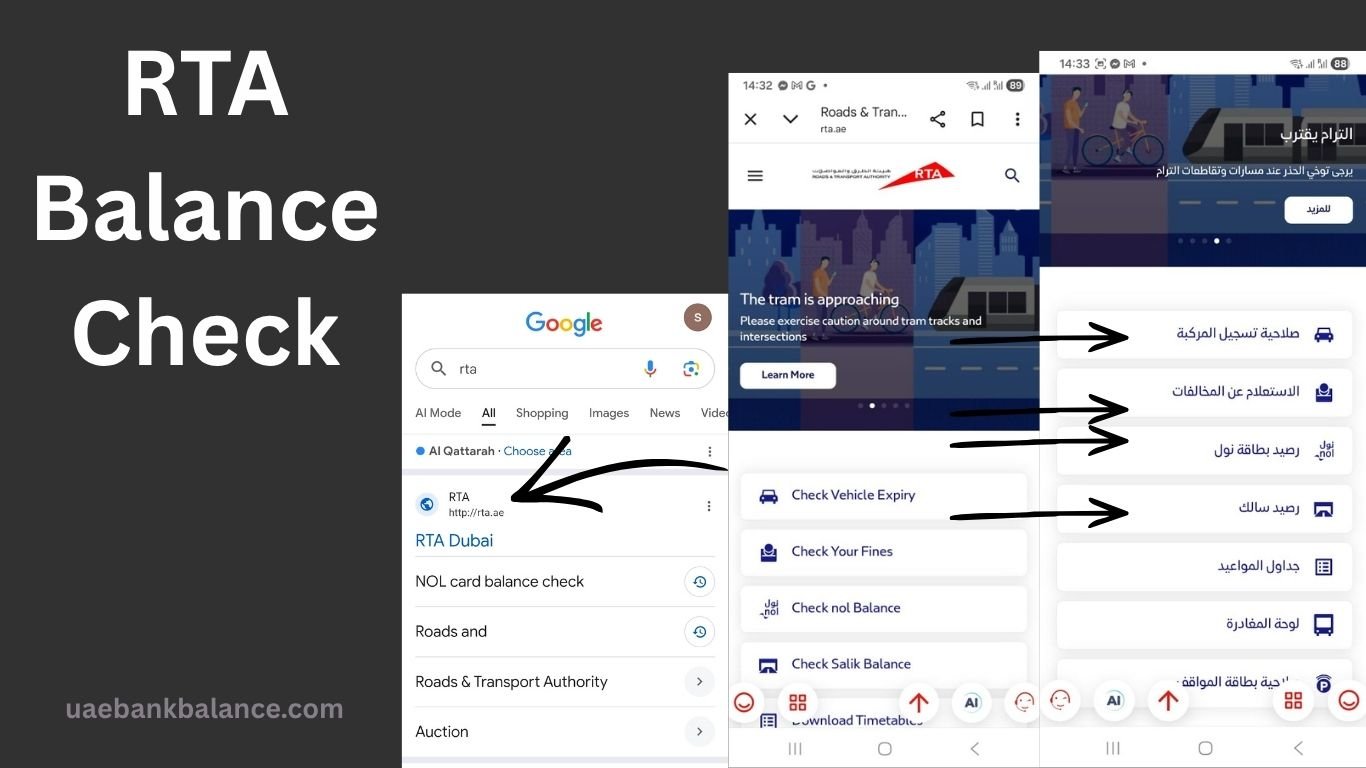
RTA Balance Check Online (Official Website Method)
Best method if you are at home.
Steps
Visit official RTA website
Go to Check Nol Balance section
Enter your Nol card number
Click search
Your balance will be displayed
Problem Solved
No need to visit station
Works anytime
RTA Balance Check Using Mobile App
The RTA app is one of the most useful tools.
Steps
Download RTA Dubai App
Login or continue as guest
Enter Nol card number
View balance instantly
Benefits
Easy to use
Works 24/7
Shows history and usage
RTA Balance Check via SMS (Limited Service)
Some users may receive SMS updates.
How It Works
Balance updates after recharge
Transaction alerts
Note
Not all cards support SMS service.
What the “SMS” Mention Actually Means
In the article, SMS refers only to notifications, not balance inquiry.
SMS is used for:
- Recharge confirmation messages
- Transaction alerts (in some cases)
- Account-related updates (if linked to RTA account)
SMS is NOT used for:
- Checking Nol card balance
- Requesting balance via message
- Getting real-time balance reply
Why SMS Balance Check is Not Available
- Nol card balance is stored on the card chip (RFID)
- It is not directly connected to your mobile number
- SMS systems cannot read card data remotely
How to Check Nol Card Balance Without Internet
If you don’t have internet, use:
Metro gate
Bus validator
Ticket machine
These are the most reliable offline methods.
Common Problems in RTA Balance Check (With Solutions)
1. Balance Not Showing
Reason
Card not placed correctly
Machine error
Solution
Place card properly
Try another machine
2. Entered Metro but Balance Too Low
Reason
Minimum balance not maintained
Solution
Always keep at least AED 10
Recharge before travel
3. Online Balance Not Updating
Reason
System delay
Recent recharge not synced
Solution
Wait 5–10 minutes
Tap card at metro gate to update
4. Card Not Working
Reason
Card damaged
Expired card
Solution
Visit RTA center
Replace card
How to Recharge Nol Card (Important for Balance Users)
Methods
Metro machines
RTA website
Mobile app
Authorized shops
Steps (Machine)
Insert Nol card
Select recharge
Enter amount
Pay cash or card
Confirm
Minimum Balance Rules in Dubai
To avoid issues:
Metro entry: Minimum AED 7.50
Bus travel: Depends on zone
Parking: Deducted separately
Always maintain extra balance.
Why RTA Balance Check is Important
Avoid being stuck at metro gate
Prevent travel delays
Plan your recharge
Avoid penalties
Daily commuters rely heavily on this.
Smart Tips to Avoid Balance Issues
Check balance before leaving home
Keep minimum AED 15
Recharge regularly
Use mobile app for tracking
Avoid last-minute problems
Who Should Use RTA Balance Check
Daily commuters
Office workers
Students
Tourists
Delivery drivers
Anyone using Dubai transport system.
RTA Services Linked to Balance
RTA balance is used for:
Public transport
Parking payments
Taxi services (in some cases)
Retail payments (selected stores)
Advanced Tips for Regular Users
Link your Nol card with RTA account
Track travel history
Use auto top-up feature
Monitor spending
Future of RTA Balance System
Dubai is moving towards:
Smart payment systems
Digital wallets
Cardless travel
Mobile NFC payments
This will make balance checking even easier.
Frequently Asked Questions
How to check RTA balance quickly
Tap your Nol card at metro gate or use ticket machine.
Can I check RTA balance online
Yes, using official RTA website or mobile app.
What is minimum balance for Nol card
Usually AED 7.50 for metro entry.
Why my balance is not updating
System delay or card not synced.
Can I check balance without internet
Yes, using metro gate or machines.