NOL Card Balance Check – Complete Guide for Dubai Users (All Methods Explained)
If you are living in Dubai or traveling daily using public transport, checking your NOL card balance is very important. Without enough balance, you cannot use metro, bus, tram, or even parking services.
The NOL card is issued by Roads and Transport Authority (RTA), and it is widely used across Dubai for transportation and payments.
Many users search for:
- NOL card balance check online
- How to check NOL card balance
- NOL balance check number
- NOL card balance check by SMS
This guide gives you all exact working methods, including online, offline, app, and machine options, so you can check your balance anytime without confusion.
What is a NOL Card
A NOL card is a smart card used for payments in Dubai.
You can use it for:
Dubai Metro
Public buses
Dubai Tram
Water buses
RTA parking
Some retail shops
It works like a prepaid card. You need to top up balance before using it.
Types of NOL Cards in Dubai
Roads and Transport Authority offers different types of NOL cards.
Silver NOL Card
Most commonly used
Affordable
Suitable for regular commuters
Gold NOL Card
Access to Gold Class cabins
Higher fare than silver
Blue NOL Card
Personalized card
More security
Can recover balance if lost
Red Ticket (Paper Card)
For short-term users
Limited trips
NOL Card Balance Check Methods (Quick Overview)
Here is a quick comparison of all available methods:
| Method | Requirement | Availability |
|---|---|---|
| Online Website | Card number | 24/7 |
| RTA Mobile App | Internet | 24/7 |
| Metro Station Machine | Card | Station hours |
| Bus Validator | Card | During travel |
| Ticket Office | Card | Station hours |
Each method is useful depending on your situation.
NOL Card Balance Check Online (Official Website)
The easiest way to check your balance is online.
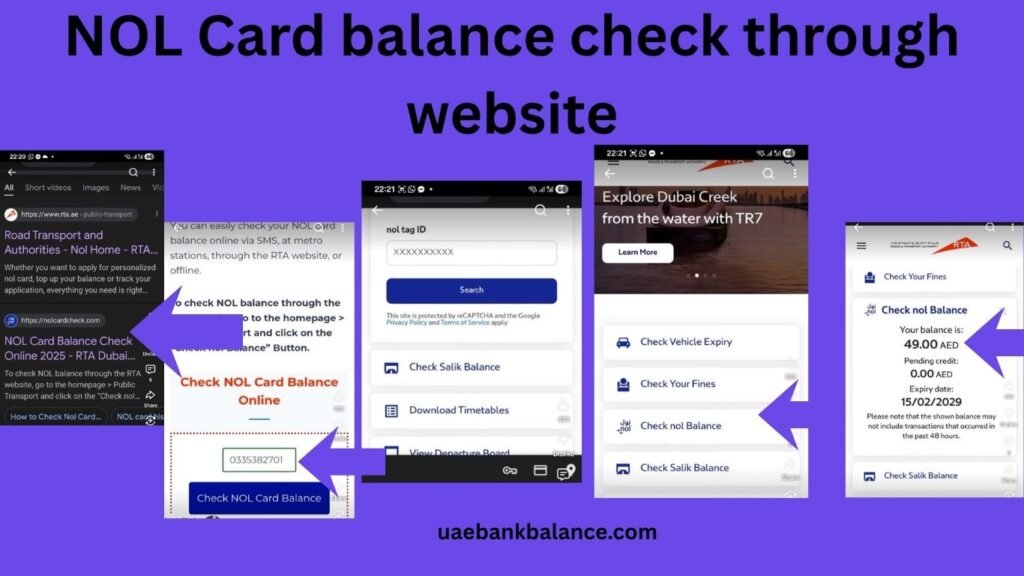
Steps
Visit the official website of Roads and Transport Authority
Go to Check NOL Balance
Enter your NOL card number
Click Search
Your balance will appear on the screen
What You Can See
Current balance
Card expiry date
Recent transactions
This method works 24/7 from anywhere.
NOL Card Balance Check Using RTA Dubai App
You can also use the mobile app.
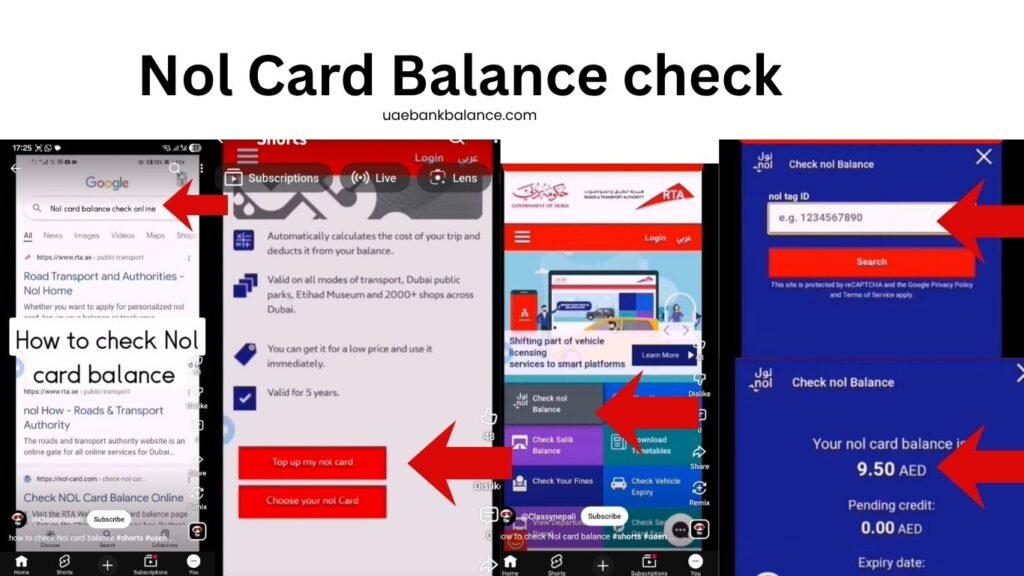
Steps
Download RTA Dubai App
Open the app
Select NOL Services
Enter card number or scan card
View your balance
Benefits
Quick access
Works anytime
Easy to use
Best for daily users.
NOL Card Balance Check at Metro Stations
If you are near a metro station, you can check your balance easily.
Using Ticket Vending Machines
Insert your NOL card
Select Check Balance
View balance on screen
Using Ticket Counters
Give your card to staff
Ask for balance enquiry
They will check and inform you
This is useful if you prefer offline methods.
Check NOL Balance Using Bus or Metro Validator
You can check balance while traveling.
Steps
Tap your NOL card on entry gate or bus machine
Balance will display on screen
Important Note
This shows balance briefly, so check quickly.
NOL Card Balance Check at Retail Shops
Some shops in Dubai support NOL services.
Steps
Give your card to cashier
Request balance check
They will scan and inform you
This is useful if you are near partner stores.
NOL Card Balance Check Without Internet
If you don’t have internet, you can:
Use metro machines
Use bus validators
Visit ticket counters
These methods do not require internet.
Minimum Balance Required for Travel
To start a trip, your NOL card must have a minimum balance.
Minimum Requirement
At least AED 7.5 required
Without minimum balance, entry is not allowed
Always keep extra balance to avoid issues.
How to Recharge NOL Card
After checking balance, you may need to top up.
Recharge Methods
Online via RTA website
Mobile app
Metro station machines
Ticket counters
Retail outlets
Steps for Online Recharge
Login to RTA website
Enter card number
Select recharge amount
Make payment
Balance will be updated
NOL Card Expiry and Validity
Each card has a validity period.
Validity
Silver/Gold cards: Up to 5 years
Red tickets: Limited validity
Always check expiry date to avoid problems.
Common Problems and Solutions
Balance Not Showing Online
Check card number
Refresh page
Try again later
Balance Not Updated After Recharge
Wait for synchronization
Tap card at metro gate
Contact support if needed
Card Not Working
Check card condition
Replace damaged card
Visit RTA center
NOL Card Customer Care
For issues, contact Roads and Transport Authority.
Customer Care Number
800 9090
Services
Balance enquiry help
Card replacement
Recharge issues
Complaint support
Available 24/7.
Tips to Manage Your NOL Card
Check the NOL balance regularly
Recharge before traveling
Keep card safe
Avoid bending card
Register card for safety
These tips help avoid travel issues.
Benefits of Checking NOL Balance Regularly
Avoid travel interruptions
Plan trips easily
Prevent penalties
Better money management
Frequently Asked Questions
How can I check my NOL card balance online
You can check it on the RTA website using your card number.
Can I check NOL balance without internet
Yes, use metro machines or bus validators.
What is the minimum balance required
Minimum AED 7.5 is required for travel.
How to recharge NOL card
You can recharge online, app, or at metro stations.
Is there any fee for balance check
No, balance check is free.