HSBC Balance Check UAE
If you are searching for HSBC balance check in the UAE, you likely want a quick and easy way to check your account balance without visiting a branch. Many UAE residents and expats need fast access to their bank balance to manage expenses, pay bills, transfer money, or track transactions.
HSBC UAE provides multiple simple and secure methods to check your account balance, including mobile banking, online banking, ATM services, and phone banking.
This guide explains all HSBC UAE balance check methods step-by-step, who can use them, requirements, and useful tips for secure banking.
HSBC Balance Check Methods in UAE
HSBC customers in the UAE can check their bank balance using several convenient methods. You can choose the option that suits you best.
1. HSBC Balance Check via Mobile Banking App (Fastest Method)
The HSBC UAE mobile banking app is the easiest way to check your account balance instantly.
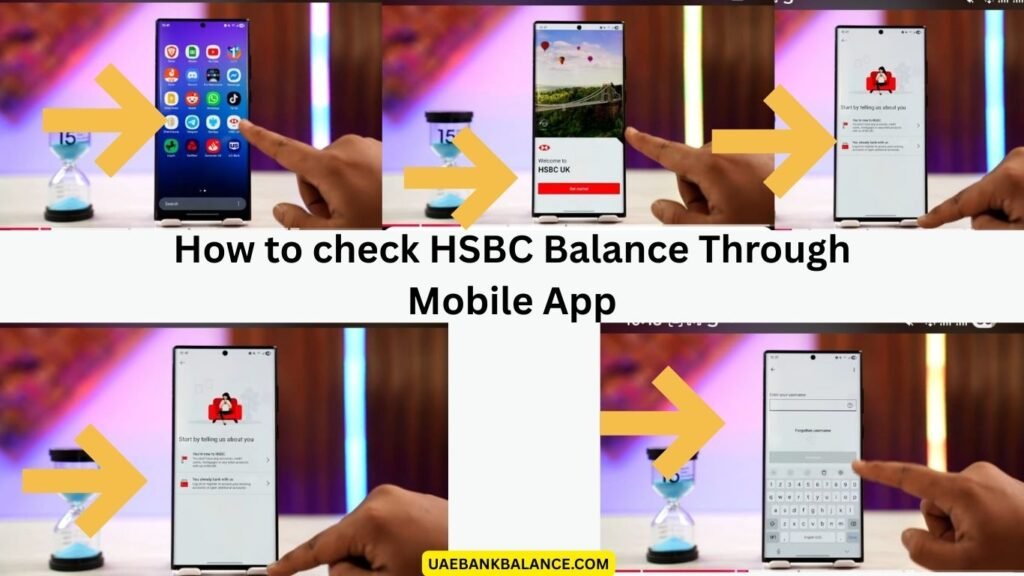
Steps to Check HSBC Balance Using Mobile App
- Download HSBC UAE Mobile Banking App from Google Play Store or Apple App Store.
- Open the app.
- Log in using username and password or biometric login.
- Select your account from dashboard.
- View your available balance and recent transactions.
Benefits
- Instant balance check
- 24/7 access
- Secure login
- Transaction history view
- Fund transfer option
- Bill payment services
This is the most recommended method for UAE customers.
2. HSBC Balance Check via Online Banking (Internet Banking)
HSBC internet banking allows customers to check their account balance from a computer or mobile browser.
Steps to Check HSBC Balance Online
- Visit HSBC UAE official website.
- Click on online banking login.
- Enter username and password.
- Select account summary.
- View your account balance.
Features
- Account overview
- Transaction history
- Fund transfers
- Credit card details
- Loan details
- Statement download
Internet banking is useful for customers who prefer desktop access.
3. HSBC Balance Check via ATM
Customers can check their balance using HSBC ATM machines across the UAE.
Steps to Check Balance at ATM
- Visit nearest HSBC ATM.
- Insert your debit card.
- Enter your PIN.
- Select “Balance Inquiry”.
- View balance on screen or print receipt.
ATM Services Available
- Balance inquiry
- Cash withdrawal
- Mini statement
- Cash deposit (CDM machines)
- PIN change
- Fund transfer
This method is useful if you need balance information while withdrawing cash.
4. HSBC Balance Check via Phone Banking
HSBC UAE provides phone banking services for account information and balance inquiries.
HSBC UAE Phone Banking Numbers
- 600 55 4722 (within UAE)
- +971 4 228 8007 (international)
Steps to Check Balance by Phone
- Call HSBC customer service.
- Choose language.
- Verify identity using account details.
- Select balance inquiry option.
- Listen to account balance.
This option works without internet access.
5. HSBC SMS Banking (If Activated)
Some HSBC customers may use SMS banking services for balance alerts and account updates.
How SMS Banking Works
- Register SMS banking through online banking or branch.
- Send balance request SMS (if enabled).
- Receive account balance notification.
Availability depends on account settings and registration.
HSBC Balance Check Requirements
To check your HSBC balance in UAE, you need basic banking credentials.
Common Requirements
- HSBC account number
- Debit card (for ATM use)
- Online banking login credentials
- Registered mobile number
- Secure PIN or password
Always keep your banking details private for security.
Who Can Use HSBC Balance Check Services
HSBC UAE balance check services are available for:
- Savings account holders
- Current account holders
- Salary account users
- Credit card customers
- Premier banking customers
- Advance banking clients
- Business account users (via online banking)
Most services are available 24/7.
Benefits of Checking HSBC Balance Regularly
Regular balance checks help customers manage finances better.
Key Benefits
- Track spending
- Avoid overdraft fees
- Monitor salary deposits
- Detect unauthorized transactions
- Plan expenses
- Manage bills and payments
Financial awareness improves money management.
HSBC Digital Banking Features Beyond Balance Check
HSBC UAE offers advanced digital banking services for customers.
Available Services
- Fund transfer within UAE
- International money transfer
- Bill payment
- Credit card payment
- Cheque services
- Account statements
- Loan management
- Card control settings
These services reduce the need to visit a branch.
Common Issues During HSBC Balance Check and Solutions
Sometimes customers face login or access issues.
Problem: Cannot Login to Mobile or Online Banking
Solution: Reset password or contact customer care.
Problem: ATM Card Not Working
Solution: Check card validity or contact support.
Problem: SMS Banking Not Available
Solution: Register SMS banking via branch or online banking.
Problem: Account Locked
Solution: Call HSBC customer service.
Security Tips for HSBC Balance Check
Always follow safe banking practices when checking your balance.
- Never share PIN or password
- Use official HSBC app only
- Avoid public WiFi for banking
- Log out after use
- Enable SMS alerts
- Update contact details regularly
Security protects your money and personal information.
Alternative UAE Banking and Service Guides (Internal Linking Opportunities)
Users checking HSBC balance often look for similar UAE banking and telecom services such as:
- Abu Dhabi Commercial Bank balance check methods
- Dubai Islamic Bank account services
- First Abu Dhabi Bank online banking guide
- Bank of Baroda UAE branch services
- Sharjah Islamic Bank account information
- du balance check guide
- Etisalat recharge and payment services
These guides help UAE residents manage financial and telecom services efficiently.
Tips for UAE HSBC Customers
- Use mobile app for fastest balance check
- Enable transaction alerts
- Check balance before large transactions
- Monitor monthly statements
- Keep registered mobile number active
These practices improve banking convenience.
FAQ About HSBC Balance Check
How can I check my HSBC account balance in UAE?
You can check your HSBC balance using mobile banking app, online banking, ATM, or phone banking services.
Is HSBC balance check available 24 hours?
Yes, mobile banking, online banking, and ATM services are available 24/7.
Can I check HSBC balance without internet?
Yes, you can use ATM services or phone banking to check your balance.
Is HSBC mobile banking safe?
Yes, HSBC mobile banking uses secure encryption and login protection for safe transactions.
Do I need to register for HSBC online banking?
Yes, you must register for online banking to access balance check and digital services.