DU Balance Check UAE
Running out of mobile balance or data unexpectedly can interrupt calls, internet access, and important online services. That’s why knowing the exact DU balance check methods helps UAE residents manage prepaid and postpaid services smoothly.
If you use a DU SIM, this guide explains how to check DU balance, data usage, account validity, and bill details using official methods provided by du — with clear steps, working codes, and practical solutions.
This is a complete UAE-focused guide on uaebankbalance.com covering prepaid, postpaid, and data balance checks.
DU Balance Check — All Official Methods in UAE
DU provides multiple ways to check your mobile balance depending on your service type. You can check balance using USSD code, mobile app, online login, SMS notifications, or customer care.
Each method works differently based on whether you use prepaid or postpaid services.
Check DU Balance Using USSD Code (Fastest Method)
This is the most widely used and quickest way to check DU balance without internet.
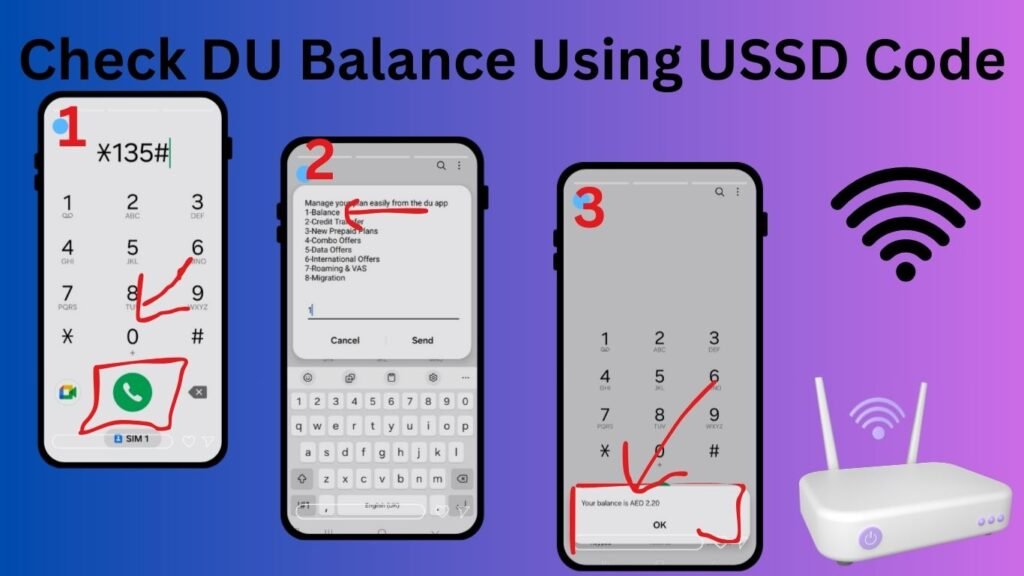
DU Balance Check Code
*135#
Steps to Check Balance
- Open your mobile dial pad.
- Dial *135#.
- Press the call button.
- Your balance details appear instantly on the screen.
What You Can See
- Main prepaid balance
- Remaining data balance
- Offer validity
- Active package details
- International minutes (if available)
Key Benefits
- Works on any phone
- No internet required
- Free service
- Available 24/7
This method is recommended for quick balance checks.
How to Check DU Data Balance
Monitoring data usage helps avoid unexpected internet interruptions.
Method 1 — USSD Code
Dial:
*135#
Then select data usage details.
Method 2 — DU Mobile App
The DU app shows:
- Remaining data
- Data consumption history
- Package expiry date
- Upgrade options
This provides more detailed information than USSD.
DU Balance Check via DU App (Full Account Details)
The mobile application provides complete account management.
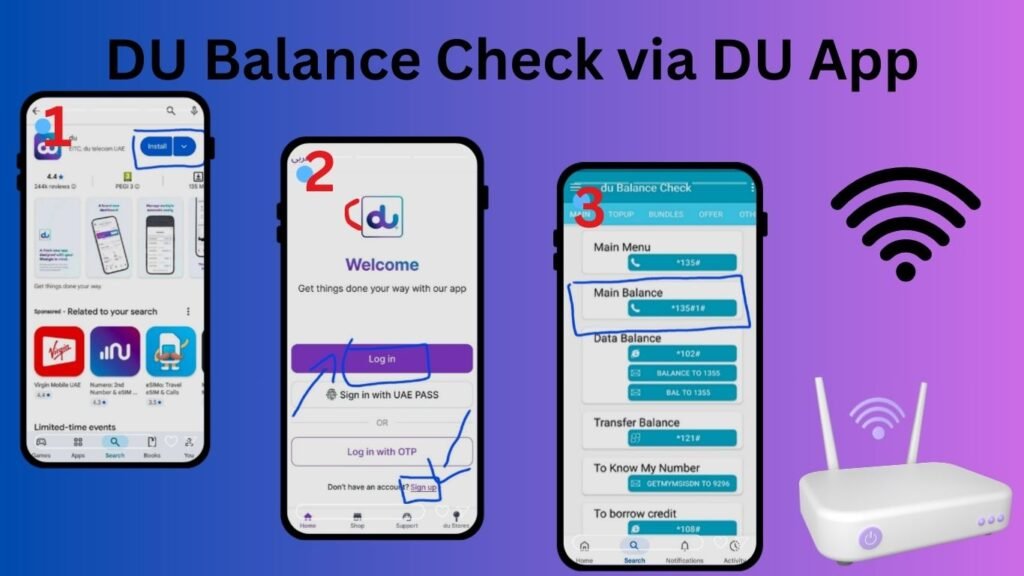
Steps to Use DU App
- Download DU app from Google Play Store or Apple App Store.
- Register using your DU mobile number.
- Verify OTP.
- Dashboard shows:
- Balance
- Data usage
- Active plans
- Bill details
- Recharge options
Why Use DU App
- Real-time balance updates
- Full usage history
- Easy recharge and bill payment
- Plan management
Best for regular users who want full account control.
DU Balance Check Online (Web Login Method)
This method is mainly used by postpaid and home service customers.
Steps
- Visit official DU website.
- Click login section.
- Enter mobile number or account details.
- Verify OTP.
- View balance and billing information.
You can also:
- Download statements
- Check bills
- Manage services
DU SMS Balance Notification
Some DU plans automatically send balance updates after:
- Calls
- Data usage
- Recharge
- Plan changes
These notifications show remaining balance and validity.
SMS alerts depend on your plan and service settings.
DU Balance Check for Postpaid Users
Postpaid customers do not have prepaid balance but can check:
- Outstanding bill amount
- Monthly usage
- Payment due date
- Data consumption
You can check postpaid details through:
- DU app
- Online login
- Customer care support
DU Customer Care for Balance Enquiry
If balance information is not showing or you face technical issues, contact DU support.
DU Customer Care Numbers
- 155 — From DU mobile
- 800155 — From other UAE networks
Customer support helps with:
- Balance issues
- Recharge problems
- Billing clarification
- Data usage details
- Service troubleshooting
Common DU Balance Check Problems and Solutions
Balance Not Showing
- Restart phone
- Check network signal
- Try USSD again
Wrong Balance Information
- Refresh DU app
- Check latest recharge
- Contact customer care
Data Finished Quickly
- Check background apps
- Monitor usage in DU app
- Upgrade plan if needed
DU Prepaid vs Postpaid Balance Check
Prepaid Users
- Check main balance
- Check data balance
- Check validity
Postpaid Users
- Check bill amount
- Check monthly usage
- Check due date
Both services provide balance details through digital channels.
Why Regular DU Balance Check is Important
Checking balance regularly helps you:
- Avoid service interruption
- Monitor data usage
- Control mobile expenses
- Track plan validity
- Prevent unexpected charges
This is especially useful for UAE residents using mobile banking, digital payments, and online services daily.
DU Digital Services and Quick Payments
After checking balance, users can also:
- Recharge prepaid numbers
- Pay postpaid bills
- Activate data packages
- Manage services online
DU provides digital payment and recharge options through its website and mobile app.
DU Balance Services for UAE Residents
DU supports millions of UAE users with fast balance check systems, real-time account updates, and simple mobile service management. Whether you use prepaid or postpaid services, the balance check process is quick and accessible anytime.
Understanding these methods helps users stay connected without interruptions.
Frequently Asked Questions
How to check DU balance in UAE?
Dial *135# from your DU number or check balance through the DU mobile app.
What is the DU balance check code?
The official DU balance check code is *135#.
Can I check DU balance without internet?
Yes, use the USSD code *135# to check balance instantly.
How to check DU data balance?
Dial *135# or view data usage in the DU mobile app.
How can I contact DU customer care for balance enquiry?
Call 155 from DU mobile or 800155 from other networks.