MOHRE Enquiry Services UAE 2026
If you’ve spent any time on the MOHRE website, you’ve probably noticed it isn’t one single “check status” button it’s a whole catalogue of separate enquiry services, each built for a different question. That’s genuinely useful once you know your way around it, but confusing the first time you land there looking for one specific answer.
You’ll learn how to reach the enquiry services portal, what each individual service actually checks, and how the MOHRE UAE Smart Services ecosystem ties everything together across the website, the app, and in-person centres. We’ll also cover a few details most guides skip, like which services need a login and which don’t.
What Are MOHRE Enquiry Services and Why You Need Them
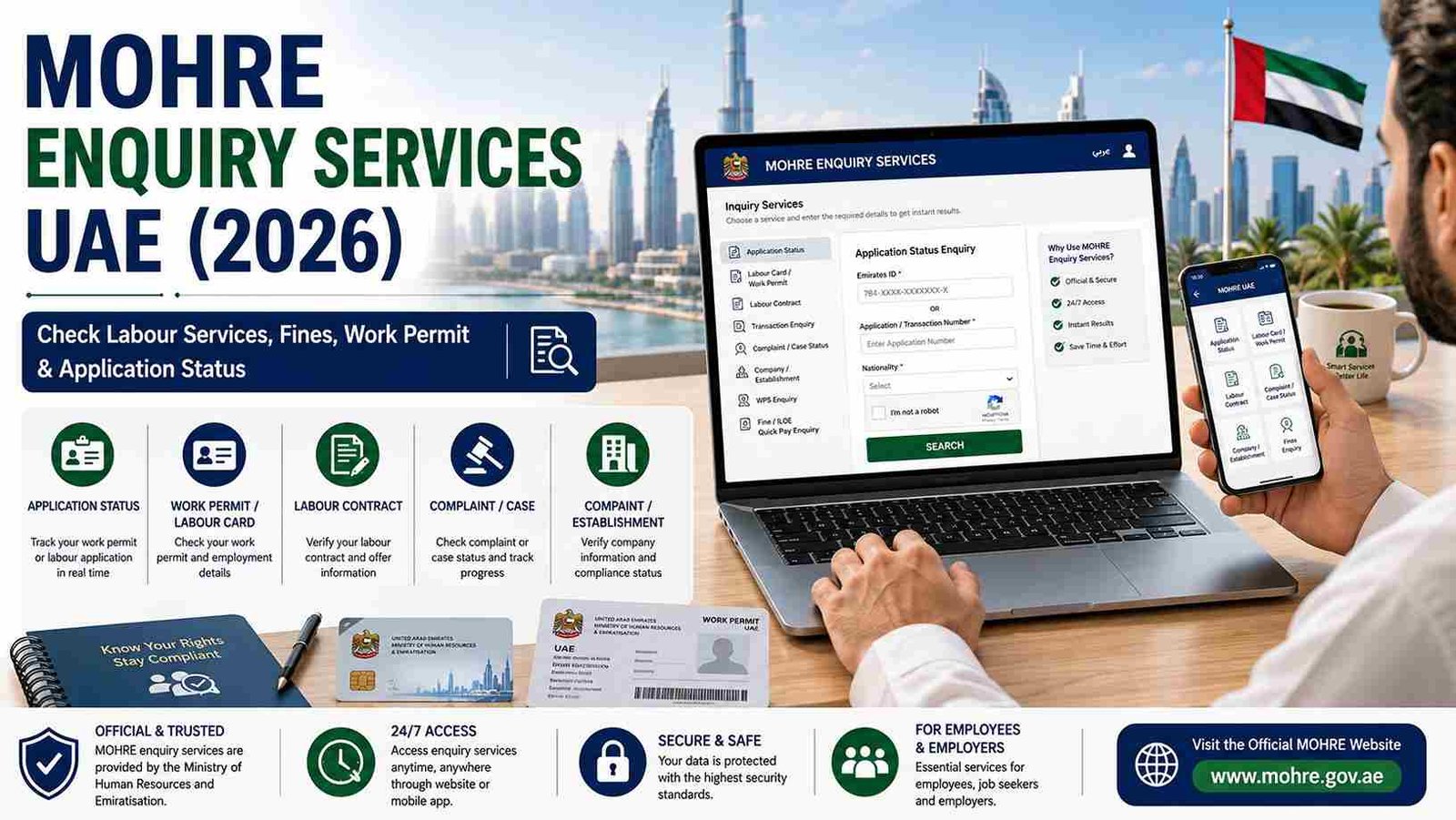
MOHRE Enquiry Services are the collection of official lookup tools run by the Ministry of Human Resources and Emiratisation that let employees, employers, and job seekers verify labour records directly against the ministry’s own database. Per MOHRE’s public service structure, these enquiry tools sit under the ministry’s broader Smart Services initiative, which pushes most transactions not just enquiries toward full digital self-service.
Why are they needed?
- Employment disputes often come down to one side assuming a status that was never actually confirmed running the enquiry yourself removes that guesswork.
- Contracts, work permits, and complaints all move through different stages, and each has its own specific enquiry tool rather than one generic search.
- Fines, transactions, and company compliance checks are separate services entirely, and using the wrong one is the most common reason a search returns nothing.
- Available 24/7 through the website or app, MOHRE enquiry services remove the need to visit a service centre just to ask “where does this stand?”
The Full List of MOHRE Enquiry Services
Here’s the breakdown of the core enquiry services you’ll encounter, grouped by what question each one actually answers.
| Service | What It Checks | Who Uses It |
| Application Status Enquiry | Tracks a work permit or labour application in real time | Employees, job seekers |
| Labour Card / Work Permit Enquiry | Confirms your legal right to work for a specific employer | Employees |
| Labour Contract Enquiry | Verifies a signed offer matches what’s registered | Employees, job seekers |
| Transaction Enquiry | Looks up a submitted transaction using its reference number | Employees, employers |
| Complaint / Case Status Enquiry | Tracks a labour complaint from filing to resolution | Employees, employers |
| Company / Establishment Enquiry | Checks whether an employer’s file and licence are compliant | Job seekers, employees |
| WPS Enquiry | Confirms salary transfer compliance | Employers, HR teams |
| Fine / ILOE Quick Pay Enquiry | Checks for outstanding fines tied to your Emirates ID | Employees |
Why this matters: picking the wrong enquiry type from this list is the single biggest reason people give up on a search thinking their record is missing, when really they just needed a different tab on the same portal.
How to Access the MOHRE Enquiry Services Portal
Step 1: Visit the Official MOHRE Website
Go directly to mohre.gov.ae in your browser. Typing the address yourself rather than clicking a search result avoids landing on one of several lookalike sites that copy MOHRE’s branding.
Step 2: Open E-Services
Click “E-Services” from the main menu, which houses the full range of MOHRE Smart Services, not just enquiries.
Step 3: Select Inquiry Services
From the E-Services menu, choose “Inquiry Services” (sometimes labelled “Enquiry Services”). This opens the full list of individual enquiry tools.
Step 4: Choose the Specific Service
You Need Pick from Application Status, Labour Contract, Transaction, Complaint, Company, or WPS Enquiry, depending on your exact question.
Step 5: Enter Your Identifying Details
Depending on the service, you’ll be asked for your Emirates ID, passport number, labour card number, transaction number, or complaint reference. Type these exactly as they appear on the original document.
Step 6: Submit and Review
Complete the captcha and click Search. Your result appears almost instantly, and most services let you download or print the outcome directly.
Tip: bookmark the Inquiry Services page specifically, rather than just the homepage, once you find it it saves you re-navigating the menu every time you need a different check.
MOHRE Smart Services: The Bigger Picture
MOHRE Enquiry Services are just one part of a much larger digital push the ministry calls Smart Services. This umbrella includes not just status checks, but full transaction processing applying for permits, renewing contracts, filing complaints, and paying fees, all without visiting a physical office.
What Smart Services generally covers:
- Self-service transactions: applying for or renewing a work permit entirely online.
- Digital document submission: uploading required paperwork directly through the portal or app instead of handing it over in person.
- Integrated payment gateways: settling fees, fines, and premiums within the same platform where you found the outstanding balance.
- UAE Pass integration: a single national digital identity that logs you into MOHRE alongside GDRFA, ICP, and other federal services.
Why this matters: enquiry services are the “read” side of this system, while Smart Services more broadly covers the “write” side actually submitting or changing something. Understanding that distinction helps you find the right menu faster, since a status check and an application submission live in different sections of the same portal.
MOHRE Enquiry Services via the Mobile App
The MOHRE UAE app mirrors nearly the entire enquiry services catalogue available on the website, with a couple of added conveniences.
Step 1: Download the MOHRE UAE App
Available on both the Apple App Store and Google Play Store.
Step 2: Log In Sign in using
UAE Pass for the smoothest experience, or your registered MOHRE username and password.
Step 3: Tap Services From the home screen, tap
“Services,” then select “Inquiry Services” from the list.
Step 4: Choose Your Enquiry
Type Select the specific service Application Status, Labour Contract, Transaction, or Complaint the same categories available on the website.
Step 5: Enter Your Details and Search
Fill in the requested Emirates ID, passport number, or reference number, then tap Search to view your result on screen.
Why this matters: the app adds push notifications for status changes on tracked applications and complaints, something the website doesn’t do automatically — genuinely useful if you’re following a pending case and don’t want to keep manually rechecking.
MOHRE Enquiry Services for Employers
Employers and HR teams have their own dedicated access point within the same enquiry ecosystem, tied to the company’s establishment file rather than a personal Emirates ID.
- Company / Establishment Enquiry: verifies a business’s own MOHRE compliance and trade licence standing.
- WPS Enquiry: confirms whether salary transfers for the entire workforce meet Wage Protection System requirements.
- Quota and Work Permit Status: tracks how many permits a company has approved or pending under its Emiratisation quota.
Tip: employers should check WPS compliance status regularly rather than only at renewal time, since a lapse here can quietly block new work permit approvals for the whole company, not just one employee.
MOHRE Public Service Access Points
Not everyone wants to run every check online, and MOHRE’s public service model accounts for that with a few parallel access routes.
- MOHRE Website: the fullest catalogue of enquiry services, best for detailed and printable results.
- MOHRE UAE App: nearly identical coverage, plus push notifications for tracked items.
- Call Centre: phone-based verification for anyone without internet access or who prefers speaking with an agent directly.
- Tasheel / Tawjeeh Service Centres: in-person help for complex cases, typically for a small service fee.
Why this matters: all four routes pull from the same underlying MOHRE database, so the actual result never changes based on which one you use it’s purely a question of which fits your situation and comfort level with digital services.
Common Reasons an Enquiry Returns No Result
- Wrong enquiry type selected: a work permit search won’t return a labour contract answer, even with correct ID details.
- Formatting mismatch: hyphens, spacing, or middle-name differences between your Emirates ID and passport are a frequent cause.
- Searching too soon after submission: most enquiry results need at least a working day to reflect a recent change.
- Using an outdated reference number: an ST number from an early offer stage is often replaced by an MB number once a transaction is actually submitted, and old references won’t pull current results.
Tip: if a search fails, try the same details under a different but related enquiry category before assuming there’s a system error a surprising number of “no result” searches are simply pointed at the wrong service.
MOHRE Enquiry Services Comparison Table
| Access Point | Best For | Login Required | Notes |
| MOHRE Website | Detailed, printable enquiry results | Sometimes | Fullest range of services |
| MOHRE UAE App | Quick checks, tracked status alerts | Yes (or public inquiry) | Push notifications for updates |
| Call Centre | Verification without internet access | No | Emirates ID verification over the phone |
| Tasheel / Tawjeeh Centre | Complex or unclear cases | No | Small service fee, in-person help |
So, the MOHRE website remains the strongest choice when you need the full range of enquiry services in one place, while the app is generally faster for a quick, single-item check you’re actively tracking.
Tips for Using MOHRE Enquiry Services Effectively
- Confirm you’ve picked the correct enquiry category before entering your details — this fixes the majority of failed searches on its own.
- Keep every reference number MOHRE issues you, since different services ask for different ones (ST, MB, transaction, or complaint reference).
- Use UAE Pass wherever it’s offered, since it removes password-reset friction and works across other federal portals too.
- Check applications a day or two after submission rather than immediately, giving the system time to reflect an update.
- Employers should review WPS and quota enquiry results on a regular schedule, not just when renewing permits.
- Save or screenshot every enquiry result that matters to you it becomes useful proof if a dispute comes up later.
- Never share your Emirates ID, UAE Pass PIN, or OTP with anyone claiming to run an enquiry “for” you outside official channels.
Frequently Asked Questions
What are MOHRE Enquiry Services?
They’re the official set of lookup tools run by the Ministry of Human Resources and Emiratisation that let you check work permits, labour contracts, complaints, transactions, and company compliance directly against MOHRE’s database.
How do I access MOHRE Inquiry Services online?
Go to mohre.gov.ae, open E-Services, select Inquiry Services, choose the specific enquiry type, enter your details, and click Search.
What’s the difference between MOHRE Enquiry Services and MOHRE Smart Services?
Enquiry Services cover checking existing records and statuses, while Smart Services is the broader term for MOHRE’s full digital ecosystem, including submitting applications and processing payments online.
Do I need to log in to use MOHRE Enquiry Services?
Some public status checks don’t require login, but enquiries tied to your personal file like complaint history or detailed contract records typically need you to sign in via UAE Pass or a MOHRE account.
Why does my MOHRE enquiry keep showing no result?
The most common reasons are selecting the wrong enquiry category, a formatting mismatch in your ID details, or searching too soon after submission.
Can employers use MOHRE Enquiry Services too?
Yes, employers use dedicated services like Company/Establishment Enquiry and WPS Enquiry to check compliance status across their entire workforce.
Is there a mobile app for MOHRE Enquiry Services?
Yes, the MOHRE UAE app mirrors most enquiry services available on the website and adds push notifications for tracked applications and complaints.
What documents do I need for a MOHRE enquiry?
Typically your Emirates ID, passport number, labour card number, or a specific transaction/complaint reference number, depending on the enquiry type.
Final Thoughts
MOHRE Enquiry Services can feel like a maze the first time you go looking for a specific answer, but once you know the service names line up directly with the question you’re asking, it becomes a two-minute task rather than a guessing game. If you’re tracking something actively, the app’s push notifications save you the trouble of manually checking.
If you need the full detail or a printable record, the website’s broader catalogue is the stronger option. Whichever route you choose, double-check you’re in the right enquiry category first it solves most “no result” searches before they even start.
Disclaimer: This article is provided for informational purposes only and is not affiliated with or endorsed by the Ministry of Human Resources and Emiratisation (MOHRE). While we strive to keep the information accurate and up to date, MOHRE services, enquiry options, and procedures may change without prior notice. Always verify the latest information through the official MOHRE website: https://www.mohre.gov.ae/ before making employment or labour-related decisions.