e& Quick Pay (2026): How to Pay e& Mobile & Home Bills Online Without Login
Paying your mobile or home internet bill should be quick, secure, and hassle-free. That’s exactly what e& Quick Pay offers. Whether you use an e& prepaid SIM, postpaid mobile plan, or home internet service, the official e& Quick Pay portal allows you to make payments online within minutes without signing in to your account.
Many users forget their login credentials or simply want the fastest way to clear an outstanding bill. Instead of opening the e& UAE app, logging into your account, and navigating through multiple menus, Quick Pay lets you pay directly by entering your mobile number or account details. The service is available 24 hours a day, making it convenient for customers who need to make a payment anytime.
Formerly known as Etisalat Quick Pay, the service continues under the e& UAE brand following the company’s rebranding. While the name has changed, the payment process remains simple and secure. Whether you need to recharge a prepaid number, pay a postpaid bill, or settle your home internet account, e& Quick Pay provides one official platform for completing your payment online.
In this guide on Uaebankbalance.com , you’ll learn everything about e& Quick Pay UAE, including how it works, supported services, payment methods, step-by-step instructions, common payment issues, safety tips, and answers to the most frequently asked questions.
What Is e& Quick Pay?
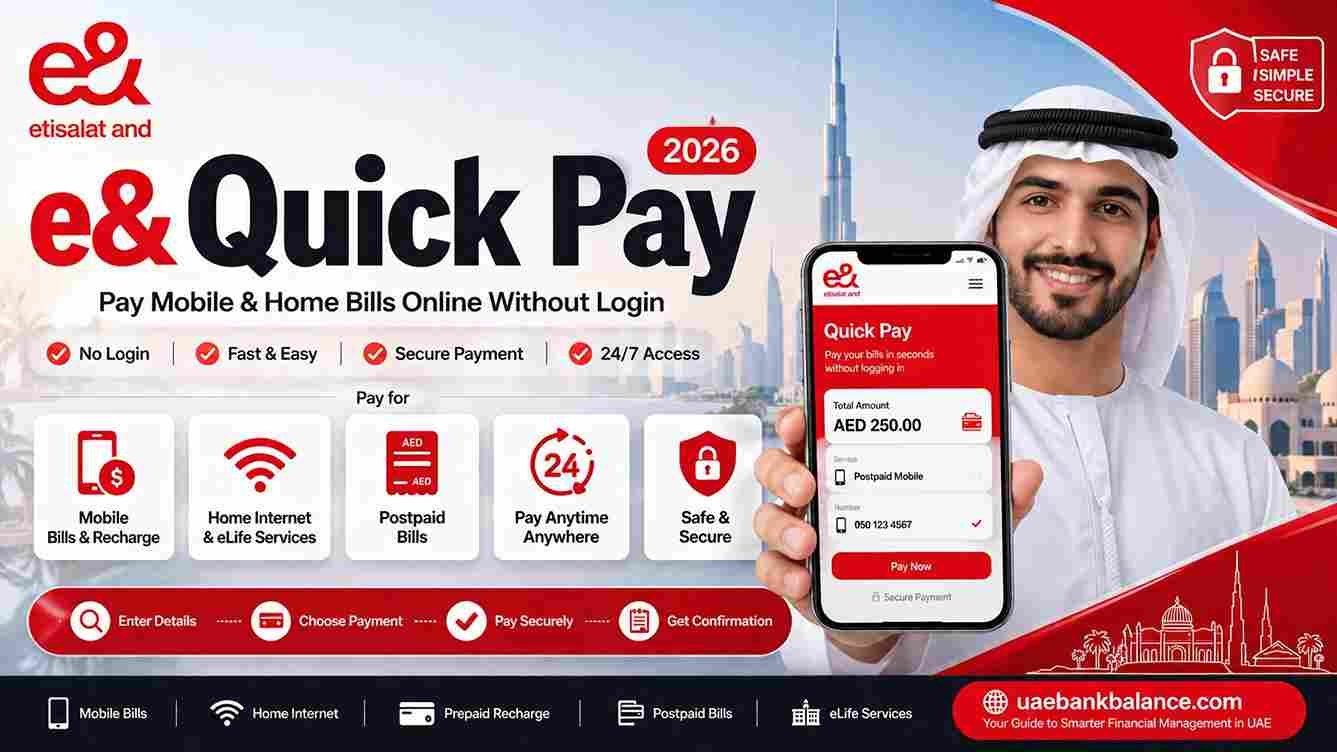
e& Quick Pay is the official online payment service provided by e& UAE that allows customers to pay eligible mobile and home service bills without logging into an account. It is designed for users who want a fast and convenient payment method while maintaining a secure online transaction process.
Unlike the full e& UAE account portal, Quick Pay focuses only on payments. You simply enter the required service information, review your outstanding balance or recharge amount, complete the payment using a supported debit or credit card, and receive instant confirmation.
The service works directly through the official e& website and supports both individual customers and many residential services.
Key Features of e& Quick Pay
One of the biggest advantages of e& Quick Pay is its simplicity. The platform eliminates unnecessary steps while still providing a secure payment experience.
Some of its main features include:
- No account login required for eligible payments.
- Fast online bill payment in just a few minutes.
- Available 24 hours a day, seven days a week.
- Supports mobile and home service payments.
- Secure payment gateway provided by e& UAE.
- Compatible with most modern web browsers.
- Instant payment confirmation after successful transactions.
- Easy access from both desktop and mobile devices.
Because everything is handled through the official e& payment portal, customers can make payments with confidence without visiting a physical store.
Which Services Can You Pay Using e& Quick Pay?
The Quick Pay portal supports several e& UAE services, making it a convenient option for customers with different account types.
Depending on your service, you can generally use Quick Pay for:
| e& Service | Supported |
|---|---|
| Mobile Postpaid Bills | ✓ Yes |
| Mobile Prepaid Recharge | ✓ Yes |
| Home Internet Bills | ✓ Yes |
| eLife Services | ✓ Yes (where applicable) |
| Residential Services | ✓ Eligible accounts |
| Business Services | Depends on the account type |
The available payment options may vary depending on your account and the type of service you use. If a particular service is not supported through Quick Pay, you can usually manage it by signing in to your e& UAE account.
Benefits of Using e& Quick Pay
Many customers choose Quick Pay because it saves time while offering the same level of security as other official payment methods.
Instead of downloading an application or remembering your account password, you can simply visit the payment page, enter your details, and complete the transaction.
Some of the key benefits include:
- Faster than traditional payment methods.
- No need to remember your username or password.
- Secure payment processing.
- Accessible from any internet-connected device.
- Immediate payment confirmation.
- Convenient for paying bills while travelling.
- Easy to use for family members making payments on your behalf.
Whether you’re paying your own bill or helping someone else recharge their mobile account, Quick Pay offers a straightforward solution.
How to Use e& Quick Pay
Making a payment through e& Quick Pay is simple and usually takes only a few minutes.
Step 1: Visit the Official e& Quick Pay Website
Open your web browser and visit the official e& UAE Quick Pay page.
Always ensure that you’re using the official e& website before entering any account information or payment details.
Step 2: Choose Your Service
Select the service you want to pay for, such as:
- Mobile number
- Home internet
- eLife account
- Other eligible services
Step 3: Enter Your Mobile Number or Account Number
Provide the requested service details exactly as registered with e&.
Double-check the number before proceeding to avoid making a payment to the wrong account.
Step 4: Review Your Outstanding Balance
The system will display your payable amount or allow you to choose the recharge value, depending on the service.
Review all information carefully before continuing.
Step 5: Select Your Payment Method
Choose a supported debit or credit card and enter the required payment information through the secure payment gateway.
Step 6: Confirm the Payment
Verify the payment details one final time and complete the transaction.
Once the payment is successful, you’ll receive a confirmation message and can save or print the receipt for your records.
How to Recharge an e& Prepaid Mobile Number
Customers using prepaid mobile services can also use Quick Pay to recharge their balance without signing in.
Simply visit the official Quick Pay page, enter the prepaid mobile number, choose a recharge amount, complete the payment using a supported card, and wait for the confirmation message.
In most cases, the prepaid balance is updated shortly after the payment has been processed.
How to Pay Your e& Postpaid Bill Using Quick Pay
If you’re an e& postpaid customer, Quick Pay provides one of the fastest ways to settle your monthly bill without logging into your account. The service is especially useful if you’re using a different device, have forgotten your login credentials, or simply want to make a payment in just a few minutes.
To pay your postpaid bill, open the official e& Quick Pay page and select the appropriate mobile payment option. Enter your registered postpaid mobile number, and the system will retrieve your account information along with the outstanding bill amount. Carefully review the details displayed on the screen to ensure they match your account before proceeding.
After confirming the bill amount, enter your debit or credit card details using the secure payment gateway. Once your payment is successfully processed, a confirmation message will appear, and you can save the payment receipt for future reference. Most payments are reflected on your account shortly after completion.
How to Pay Your e& Home Internet Bill
e& Quick Pay can also be used to pay Home Internet and eligible eLife service bills. This allows customers to maintain uninterrupted internet, television, and home communication services without visiting a service center.
Begin by visiting the official Quick Pay portal and selecting the home service payment option. Enter your account number or other requested service details exactly as shown on your monthly bill. The system will display your outstanding balance, allowing you to verify the amount before making payment.
After selecting your preferred payment method, complete the transaction through the secure payment page. Once the payment is successful, e& will generate a confirmation message that you can save or print.
Paying online is usually much faster than visiting a retail store and allows you to settle your bill at any time, including weekends and public holidays.
Payment Methods Accepted
e& Quick Pay supports several secure payment methods to make online transactions simple for customers.
| Payment Method | Supported |
|---|---|
| Visa Debit Card | Yes |
| Visa Credit Card | Yes |
| Mastercard Debit | Yes |
| Mastercard Credit | Yes |
| Apple Pay* | Available on supported devices where offered |
| Digital Wallets | May vary depending on the payment gateway |
*Availability of certain payment methods may vary based on your device, browser, and the options currently supported by e& UAE.
e& Quick Pay vs e& UAE App
Although both services allow customers to pay their bills, they are designed for different purposes.
| Feature | e& Quick Pay | e& UAE App |
| Login Required | No (for eligible payments) | Yes |
| Pay Bills | Yes | Yes |
| Prepaid Recharge | Yes | Yes |
| View Usage | No | Yes |
| Manage Account | No | Yes |
| Change Plans | No | Yes |
| View Bills & History | Limited | Yes |
| Manage Multiple Services | Limited | Yes |
If you simply want to make a quick payment, e& Quick Pay is usually the fastest option. However, if you need to manage your account, review data usage, change plans, or access additional services, the e& UAE App provides a more comprehensive experience.
Common e& Quick Pay Problems and Solutions
Most payments are completed without any issues, but users may occasionally encounter technical or payment-related problems. Understanding the possible causes can help you resolve them quickly.
Payment Failed
A failed payment may occur because of insufficient card funds, temporary banking restrictions, incorrect payment details, or network interruptions. Double-check your card information and try again after a few minutes. If the issue continues, contact your bank or e& customer support.
Incorrect Mobile Number
Always verify the mobile number or account number before confirming payment. Entering incorrect information could result in a payment being applied to another eligible account.
Outstanding Bill Not Displayed
If the Quick Pay page does not display your bill, ensure that you entered the correct account details. Newly generated bills may also take some time to appear in the system.
Payment Is Still Pending
In some situations, payments may require additional processing time. Avoid making another payment immediately unless your bank confirms that the previous transaction failed. If the amount remains pending for an extended period, contact e& customer support with your payment receipt.
Card Declined
A declined card may result from expired cards, incorrect security details, insufficient funds, or restrictions imposed by your card issuer. Contact your bank if you believe your card should have been accepted.
Tips for a Smooth Payment Experience
Using a few simple precautions can make your payment process quicker and more secure.
- Use a stable internet connection before starting your payment.
- Double-check your mobile or account number.
- Keep your debit or credit card ready.
- Save your payment confirmation or receipt.
- Refresh your account after payment if the balance does not update immediately.
- Use the latest version of your web browser for the best experience.
Safety Note
Always access e& Quick Pay through the official e& UAE website. Never enter your payment details on unofficial websites or links received through unsolicited emails, SMS messages, or social media. Do not share your OTP, banking PIN, password, or card verification code (CVV) with anyone, even if they claim to represent e&. If you receive suspicious messages requesting payment or personal information, contact e& through its official customer support channels before taking any action.
Frequently Asked Questions
Can I use e& Quick Pay without logging in?
Yes. One of the main advantages of e& Quick Pay is that eligible customers can pay mobile or home service bills without signing into an e& account.
Is e& Quick Pay available 24/7?
Yes. The online payment portal is generally available at all times, although temporary maintenance may occasionally affect availability.
Can I recharge someone else’s mobile number?
Yes. You can usually enter another eligible e& prepaid mobile number and complete the recharge using your own payment card.
How long does payment confirmation take?
Most successful payments are confirmed immediately, although account updates may occasionally take a short time depending on system processing.
Is e& Quick Pay secure?
Yes. Payments are processed through the official e& UAE payment gateway. For maximum security, always use the official website and never share sensitive banking information with anyone.
Conclusion
e& Quick Pay offers a fast, convenient, and secure way to pay mobile, prepaid, postpaid, and eligible home internet bills without logging into an account. Whether you need to recharge a prepaid number, settle a monthly postpaid bill, or pay for your home services, the official Quick Pay portal simplifies the process with just a few steps. By using only official e& payment channels and following basic online security practices, you can complete transactions confidently while keeping your account and payment information protected.
Official Resources
- e& UAE Official Website: https://www.etisalat.ae/
- e& UAE Quick Pay: https://www.etisalat.ae/en/c/paybill-quick-pay.html
- e& UAE Help & Support: https://www.etisalat.ae/en/help/